Enterprise Knowledge Management Software: A Buyer's Guide for 2026
Compare enterprise knowledge management software by category, security, connectors, governance, pricing, and deployment to choose the right approach for your organisation.
9 min readby Prithvi

Enterprise knowledge management software is the category companies buy when information exists somewhere in the organisation but nobody can reliably find it, trust it, or act on it. The category is old. What changed recently is that half the vendors in it now answer questions instead of storing documents, and those are not the same product even when they share a page on a comparison site.
This guide is about the buying decision at enterprise scale — thousands of employees, multiple systems of record, a security review, a procurement cycle. If you want the shorter version focused on AI-native tools specifically, read best AI knowledge management platforms. If you want the conceptual grounding first, start with the practical guide to enterprise knowledge management systems.
The four categories hiding inside one search
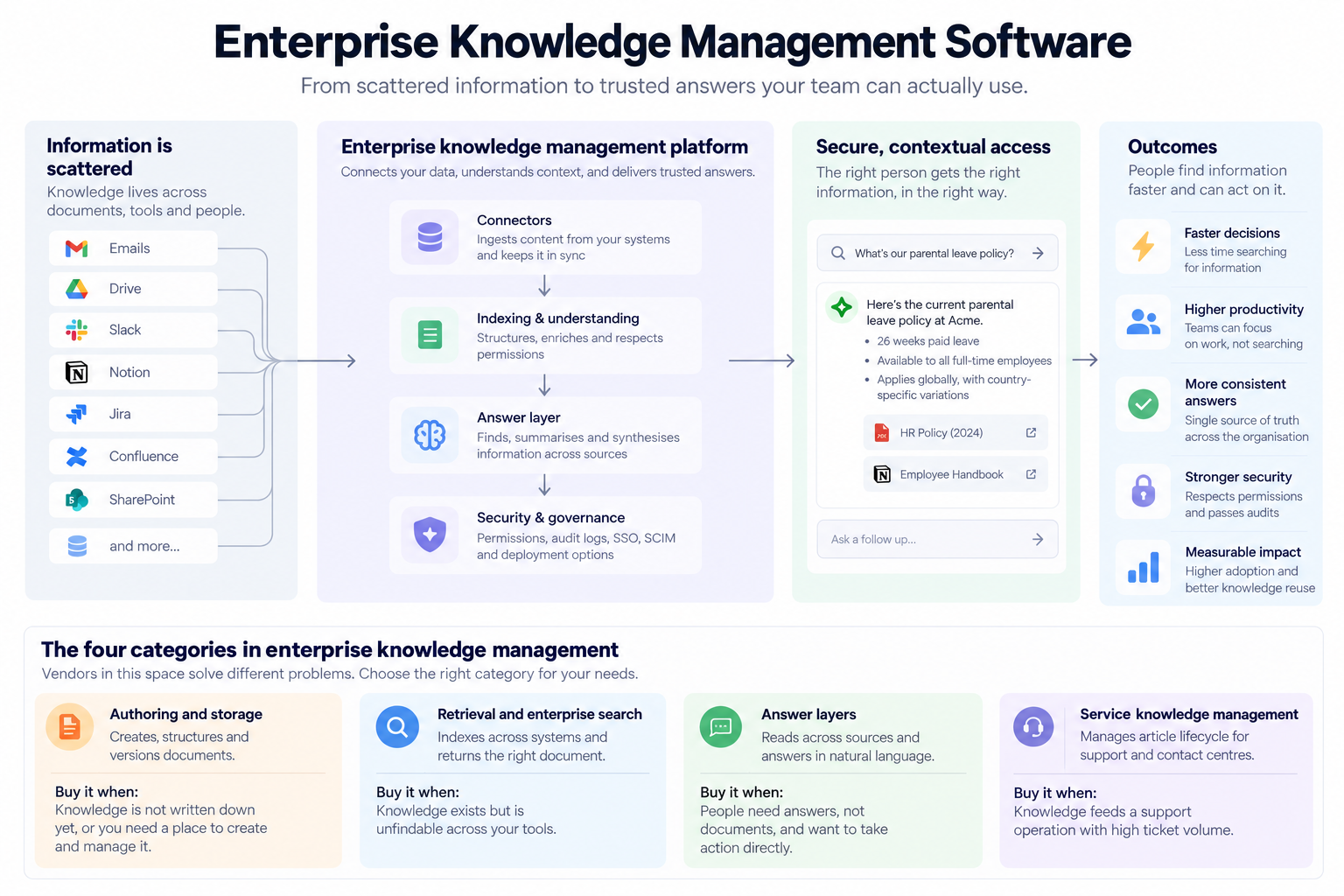
Vendors that appear side by side in this category solve materially different problems. Buying the wrong category is the most common failure, and it is usually discovered nine months in, after rollout.
| Category | What it does | Buy it when |
|---|---|---|
| Authoring and storage | Creates, structures and versions documents | Knowledge is not written down |
| Retrieval and enterprise search | Indexes across systems and returns the right document | Knowledge is written down but unfindable |
| Answer layers | Reads across sources and answers in natural language | People need answers, not documents |
| Service knowledge management | Manages article lifecycle for support and contact centres | Knowledge feeds a support operation |
Most enterprises already own something in row one. The procurement conversation is almost always about rows two and three, and the mistake is buying row one again in a nicer interface.
What "enterprise" actually changes
The functional requirements of knowledge management do not change much between a 50-person company and a 5,000-person one. The non-functional requirements change completely, and they are what the evaluation should turn on.
Permission fidelity. In a small company, everyone can see most things. In an enterprise, a knowledge tool that flattens permissions is a data breach waiting to be discovered. The system must respect the source system's access controls at query time, per user, not at index time. Ask whether permissions are evaluated live or copied on a schedule, because a copied permission is stale the moment someone changes teams.
Deployment model. Cloud is the default. Regulated industries frequently cannot use it for some data classes. The options are multi-tenant cloud, single-tenant or BYOC (your cloud account, vendor-managed), and self-hosted. Vendors vary wildly here and it is rarely on the pricing page. See BYOC for enterprise AI for how the models differ in practice.
Connector depth. Every vendor lists the same forty logos. The distinction is what the connector actually does — whether it reads file contents or only metadata, whether it handles comments and threads, whether it syncs incrementally or rebuilds, and whether it preserves permissions. A shallow connector to a critical system is worse than none, because it produces confident answers from partial data.
Auditability. At enterprise scale someone will eventually ask why the system gave a particular answer. Systems that can show retrieved sources per answer survive that conversation. Systems that cannot, do not.
Identity and lifecycle. SSO is table stakes. SCIM provisioning, group-based access inherited from your directory, and clean deprovisioning are the parts that get raised in security review and stall deals.
The platforms
Listed by category rather than rank, because the ranking depends entirely on which of the four problems above you have.
Microsoft (SharePoint, Viva Topics, Copilot)
Category: Storage and answer layer, bundled.
The default in Microsoft-centric enterprises, and the incumbent most evaluations are implicitly measured against. Deep native integration with the Office estate, and the commercial case is straightforward when the licences are already bought.
Best for: Organisations where the overwhelming majority of knowledge genuinely lives in Microsoft 365.
Where it loses: Knowledge outside the Microsoft estate is a second-class citizen. If your engineering team lives in Slack, GitHub and Linear, coverage gaps show up immediately and the answer quality drops in exactly the places where tribal knowledge is thickest.
Pricing: Bundled and add-on licensing; sales-led at enterprise tiers.
Atlassian (Confluence with Rovo)
Category: Authoring and storage, with a retrieval layer added.
Confluence remains one of the most widely deployed knowledge stores in software organisations. Rovo adds search and answers across Atlassian and connected third-party tools.
Best for: Companies already standardised on Jira and Confluence, where the documentation habit exists.
Where it loses: Inherits Confluence's structural problems — page sprawl, stale content, and the perennial question of which of the four similarly named pages is current. A retrieval layer over unmaintained content returns unmaintained content, faster.
Pricing: Published per-seat tiers, with enterprise plans sales-led.
Glean
Category: Enterprise search and answer layer.
The most visible pure-play in the category. Indexes across a wide connector set and answers over the result, with a permissions model built for the enterprise case.
Best for: Large organisations with genuinely fragmented tooling, where the core problem is retrieval across many systems.
Where it loses: Priced for scale, which makes it a hard fit below a few hundred seats. It is a strong retrieval layer over what already exists — if the knowledge was never written down, retrieval has nothing to retrieve.
Pricing: Sales-led, no published pricing.
Guru
Category: Authoring with verification workflow.
Distinguished by treating staleness as the primary problem. Cards carry owners and verification dates, and the system chases humans to re-confirm accuracy on a cycle.
Best for: Support and sales enablement teams where answer accuracy matters more than corpus breadth.
Where it loses: The verification model requires sustained human effort. It works where a team is accountable for a bounded set of content, and degrades where knowledge is diffuse across hundreds of contributors.
Pricing: Published per-seat tiers.
eGain
Category: Service knowledge management.
Built for contact centres, with article lifecycle, guided decision trees and compliance workflow. A different lineage from the productivity-tool vendors above and it shows in the feature set.
Best for: Regulated service operations — financial services, insurance, healthcare — where the knowledge feeding agents must be provably controlled.
Where it loses: Overweight for general internal knowledge management. If you are not running a contact centre, you are buying and configuring machinery you will not use.
Pricing: Sales-led.
Upland Panviva
Category: Service knowledge management.
Similar lineage to eGain — knowledge delivered into agent workflow, with strong governance over publication and change control.
Best for: Large service operations with strict process compliance requirements.
Where it loses: Same as above, plus an interface that reflects the category's enterprise-software heritage rather than modern productivity tooling.
Pricing: Sales-led.
Notion
Category: Authoring and storage, with AI retrieval added.
Has become the default knowledge home for a large share of newer companies, largely because people will actually write in it.
Best for: Companies where Notion is already the system of record and adoption is genuinely high.
Where it loses: Enterprise governance is thinner than the incumbents — permission granularity, audit trails and lifecycle controls are the gaps that surface in security review. Retrieval quality outside Notion depends on connectors that are newer than the competition's.
Pricing: Published per-seat tiers; enterprise plans sales-led.
Onyx (formerly Danswer)
Category: Open-source enterprise search and answer layer.
Self-hostable, connector-based, and the pragmatic choice where data cannot leave your infrastructure and you have engineers willing to own the deployment.
Best for: Technically capable teams with hard data-residency constraints or a strong build-over-buy preference.
Where it loses: You own the operations — upgrades, connector maintenance, scaling, evaluation. The licence is free; the running cost is engineering time, and that cost is frequently underestimated in the business case.
Pricing: Open source, with a commercial cloud option.
Libra
Category: Answer layer with capture, built on the company's actual work.
Libra WorkBase indexes across the systems a company already uses and answers over them, with the capture side handled by the Meeting Assistant and Email Assistant so decisions made in a meeting or an email thread enter the knowledge layer without anyone writing a document. Permissions are evaluated per user against source systems. Deployable in cloud, VPC or self-hosted.
Best for: Companies whose knowledge problem is partly a capture problem — where the answers exist in conversations and threads rather than in documents nobody has written.
Where it loses: A young product against incumbents with a decade of enterprise procurement scar tissue. If your requirement is a heavily governed contact-centre knowledge operation, the service knowledge management vendors above are purpose-built for it and Libra is not.
Pricing: Published per-seat tiers, sold by team; enterprise deployment sales-led.
At a glance
| Platform | Primary category | Self-host / BYOC | Published pricing |
|---|---|---|---|
| Microsoft | Storage + answers | No | Partial |
| Confluence + Rovo | Authoring + retrieval | No | Yes |
| Glean | Search + answers | BYOC available | No |
| Guru | Authoring + verification | No | Yes |
| eGain | Service KM | Varies | No |
| Upland Panviva | Service KM | Varies | No |
| Notion | Authoring + retrieval | No | Yes |
| Onyx | Search + answers | Yes | Open source |
| Libra | Answers + capture | Yes | Yes |
How to run the evaluation
Most enterprise evaluations in this category are decided by demo quality, which is a poor predictor of production performance. Four things predict it better.
1. Test with your worst content, not your best. Vendors demo against clean corpora. Run the pilot against the messiest, most contradictory, most out-of-date part of your documentation. Every system looks good on a well-maintained corpus, and no enterprise has one.
2. Test permission boundaries deliberately. Create a test account with restricted access and ask it questions whose answers live in documents it should not see. A system that leaks in a pilot will leak in production, and this is the single failure mode that turns a productivity project into an incident.
3. Ask thirty real questions from real employees. Not curated ones. Collect actual questions from a support channel or an all-hands, and score answers as correct, incomplete, or wrong-with-confidence. The third category is the one that matters — a system that is confidently wrong is worse than one that says it does not know.
4. Measure the failures, not the successes. Instrument what people searched for and did not find. That list is the single most useful artefact the pilot produces, and it tells you whether your problem is retrieval or capture — which determines whether any of these tools will help at all.
When the software is not the problem
Enterprise knowledge management software fails most often for reasons no vendor can fix.
If the knowledge was never written down, a retrieval layer has nothing to retrieve. If nobody owns accuracy, a verification workflow just generates ignored notifications. If the organisation's real answer to "how do I do this" is "ask Priya," the tool will be bypassed the moment it is slower than asking Priya.
The honest diagnostic is to look at where knowledge actually lives today. If it lives in documents, buy retrieval. If it lives in people's heads and in conversations, retrieval will disappoint you and the problem is capture. Buying the wrong one is expensive and slow to discover.
Where Libra fits
Libra WorkBase sits in the answer layer, with the assumption that a meaningful share of organisational knowledge was never written down. The Knowledge Base indexes across connected systems and answers with sources attached; the Meeting Assistant and Email Assistant capture decisions as they are made, so the corpus grows from work rather than from documentation effort. Permissions resolve per user against the source systems, and deployment runs in cloud, VPC or self-hosted.
It is the right shape for companies whose problem is partly capture. It is the wrong shape for a governed contact-centre knowledge operation, where the service KM vendors are purpose-built.