Free Knowledge Base Software: What You Actually Get for $0
Compare free knowledge base software, including Onyx, Libra, Notion, and Confluence. Understand free-plan limits, self-hosting costs, and when to upgrade.
11 min readby Prithvi

Search for free knowledge base software and you will get a list of ten tools. Most of them are not free.
Some are 14-day trials. Some are free plans so constrained that the product stops working the moment a second person joins. A couple are genuinely free forever, and they are free in two completely different ways that commit you to two completely different futures.
This is what each kind of free actually gets you, where each one stops, and what the $0 option costs you somewhere other than the invoice.
What Does "Free" Actually Mean in Knowledge Base Software?
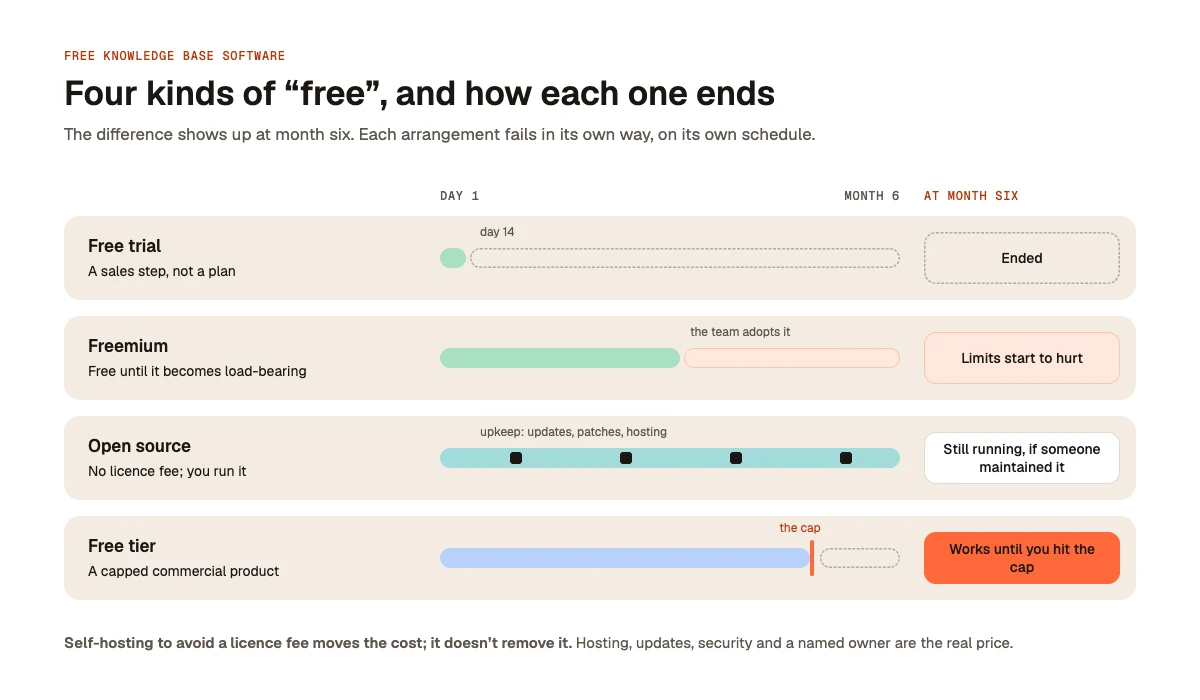
The word covers four arrangements that have almost nothing in common. Knowing which one you are being offered tells you how it will end, because each fails in its own way and on its own schedule.
1. Free Trials
A free trial is a sales step.
Slite offers a 14-day trial across its Basic and Pro features without requiring a card, after which you pay. This is genuinely useful for evaluation and completely useless for long-term budgeting.
If a comparison article includes a time-limited trial in a roundup of free knowledge base tools, it is padding the list.
2. Freemium Plans With Feature Limits
Freemium is free until the product becomes load-bearing.
Notion's free plan is designed to let individuals get started, but its restrictions become more relevant when a team adopts it. File uploads, page history, guest access, and other capabilities have limits that can affect a shared knowledge base.
None of these restrictions necessarily matters while you are trying the product alone. They become much more significant when your team relies on it.
3. Open-Source Knowledge Base Software
Open source is free permanently in a way no vendor can revoke, subject to the licence terms.
Onyx is an open-source option for teams that want to operate their own knowledge and search infrastructure. The licence may cost nothing, but running the system still requires operational capacity.
What you are agreeing to is operational, not financial.
4. Free Tiers of Commercial Products
A free tier is a capped version of a commercial product.
Libra's pricing page describes its self-deployed offering, which is intended to let smaller teams use the product within defined usage limits. Check the current eligibility, user cap, deployment requirements, and usage restrictions before committing.
The cap is part of the business model: it is sized to be useful for a small team and to create a natural upgrade point as requirements grow.
The practical difference becomes clear at month six. A trial has ended. A freemium plan may have started hurting. Open source remains available, assuming someone has maintained it. A capped free tier works until you reach its limits, at which point you need another plan.
For a broader look at how these systems differ, see our guide to enterprise knowledge management systems.
Free Knowledge Base Software Compared: Where Each Tool Stops
The following comparison separates genuinely free options from trials and products that require a paid subscription. Limits can change, so verify the vendor's current terms before making a decision.
| Tool | Type of free access | What you get | Main limitation |
|---|---|---|---|
| Onyx | Open source | Self-hosted deployment without a per-seat licence fee under its open-source offering | Infrastructure, maintenance, and operational ownership |
| Libra | Free self-deployed tier, subject to current terms | A way to evaluate the product within its published deployment and usage limits | Eligibility, user cap, and daily usage limits |
| Notion | Freemium | A free starting point for individual use and lightweight documentation | Team, upload, history, and other feature restrictions |
| Confluence | Freemium | A free entry point for teams using Atlassian's documentation ecosystem | Verify the current user cap and feature limits |
| Slite | Free trial | Temporary access to evaluate paid-plan features | Trial expiry |
| Guru | Paid product | Knowledge management with commercial plans | No permanent free tier assumed here |
| Document360 | Paid product | Dedicated knowledge base software | Paid-plan requirements |
| Helpjuice | Paid product | Dedicated knowledge base software | Paid-plan requirements |
Important pricing note: The exact free-plan limits, pricing, and availability of self-deployed options should be confirmed on the relevant vendor's current pricing page. In particular, verify Confluence's current free-tier user cap directly with Atlassian rather than relying on third-party comparison articles.
The row worth sitting with is Notion's. An upload limit sounds harmless until someone tries to attach the onboarding deck. Limited page history sounds harmless until somebody overwrites a runbook and nobody notices for two weeks.
These restrictions matter because they can affect the reliability of a shared knowledge base. The right question is not simply whether a tool is free, but whether its free plan can support the way your team actually works.
The Hidden Cost of Free Knowledge Base Software
If you self-host to avoid a licence fee, you have moved the cost rather than removed it.
Here is what you take on.
1. Infrastructure and Hosting
A self-hosted knowledge base may require compute, storage, indexing infrastructure, and database services.
If you want AI-powered search rather than basic keyword search, you may also need model inference or API access. Self-hosting the application does not automatically mean you are self-hosting the AI model.
You may still pay a provider for every token unless you also run inference yourself, which introduces another operational project.
2. Someone Has to Own It
Somebody needs to be responsible for keeping the system available, updated, and useful.
Not a volunteer. Not a side project. A named person with responsibility for the system.
This is the cost that sinks many self-hosted deployments because it is invisible at installation time and unavoidable a few months later.
3. Software Updates and Maintenance
You take responsibility for upgrades on your own schedule, including breaking changes and security patches you might otherwise defer.
That flexibility is useful, but it also means the responsibility for maintaining the deployment sits with your team.
4. Security and Access Controls
Self-hosting can give you greater control over where information is stored and how the system is deployed. It does not automatically make the deployment secure.
Your team still needs to configure access controls, manage credentials, apply patches, and review the security of the surrounding infrastructure.
For enterprise deployments, these operational requirements should be part of the evaluation from the beginning.
What Does Self-Hosting Actually Cost?
A fair comparison is the fully loaded cost of self-hosting against a commercial subscription, not $0 against the sticker price.
Consider a hypothetical 40-person team. At $10 per user per month, a subscription would cost $400 per month, or $4,800 annually, before taxes and any additional charges.
If self-hosting consumes two engineering days a month, it may cost more than the subscription at realistic loaded labour rates.
If it consumes only two hours a month because the team already runs similar infrastructure and the knowledge base is one more service, self-hosting could save most of that subscription cost.
Both outcomes are possible. Which one you get depends heavily on your existing infrastructure and operational capacity, not just the software licence.
Where self-hosting wins regardless of the arithmetic is when data residency is a hard requirement rather than a preference. If a contract or regulation requires information to remain within a particular environment, cost may not be the deciding variable.
In that case, investigate Onyx or Libra's deployment options, and budget for the operational responsibilities properly.
When Free Knowledge Base Software Is the Right Choice
Free is the correct answer more often than vendors would like, particularly in three situations.
1. You Are Testing Whether a Knowledge Base Helps at All
Plenty of teams buy knowledge base software to solve a problem that turns out to be a communication problem.
A free plan or a self-deployed option can help you test whether people actually look things up before you commit to a paid subscription.
Start small, document recurring questions, and observe whether employees use the information. You do not need an enterprise contract to establish whether the use case is real.
2. You Have a Small Team and Someone Who Can Maintain the System
For a small team with an engineer who enjoys managing infrastructure, open-source software can be a genuinely cost-effective choice.
Onyx is worth evaluating if you want control over deployment and are comfortable operating the stack. A self-deployed commercial product may also be worth considering if its current free tier fits your team and usage.
The key is to account for maintenance time rather than treating it as free.
3. Your Data Cannot Leave Your Network
If your organisation has strict data residency or deployment requirements, open-source and self-hosted options may be more appropriate than cloud-only tools.
In this case, a free licence is a bonus, not the primary reason for choosing the product.
The priority is finding a solution that satisfies your deployment and security requirements while remaining operationally manageable.
When Free Knowledge Base Software Is a Mistake
There are two situations where choosing a free plan can create more problems than it solves.
1. Nobody Will Own the Knowledge Base
An unmaintained knowledge base is worse than no knowledge base.
People ask it something, get a stale answer, get burned once, and never come back. Now you have both the original problem and a system nobody trusts.
If you cannot name the person responsible before you install anything, consider a hosted option that reduces your team's infrastructure burden.
Remember that hosted software does not eliminate the need to maintain the content itself. Somebody still needs to ensure the answers remain accurate.
2. You Are Already Paying for Something That Does the Job
If your company already pays for Notion or Confluence, use what you have before evaluating another product.
The best knowledge base is often the one people already have open. A second system competing with the first is a common way these projects lose adoption.
Before introducing another tool, establish whether the existing one can support your needs.
If your team has a documentation problem, another documentation tool may not be the answer. If the problem is that information is scattered across Slack, email, meetings, and business applications, a system that connects those sources may be more useful than another repository.
Our guide to what a knowledge base is and how AI is changing knowledge management explains this distinction in more detail.
How to Choose Free Knowledge Base Software in Four Questions
Ask these questions in order. Each one narrows the options, and the first answer that disqualifies a tool means you can stop evaluating it.
1. Is the Data Allowed to Leave Your Network?
If not, focus on products that support the deployment model your organisation requires.
Onyx and Libra's deployment options are worth investigating, but verify the exact architecture, data flows, and security controls before deciding that either meets your requirements.
Everything else is secondary to satisfying the deployment constraint.
2. How Many People Need Access?
Your team size determines whether a free plan is practical.
Check the actual user limits, feature restrictions, and usage caps rather than relying on the word "free."
If your team is approaching a plan's maximum, evaluate the cost of upgrading before migrating your documentation.
3. Will Someone Own the Infrastructure?
If nobody can maintain a self-hosted deployment, a hosted plan may be the better choice.
This question can override the previous two for teams without strict residency requirements. Organisations with mandatory self-hosting constraints, however, need to solve the ownership problem rather than ignore it.
4. Are You Evaluating a Trial or Choosing a Long-Term Solution?
If you are still establishing whether a knowledge base earns its place, choose the option that is fastest to set up and revisit the decision in a month.
Do not spend three weeks evaluating tools for a problem you have not confirmed you have.
If the use case is proven, compare the long-term cost, operational requirements, integrations, permissions, and upgrade path.
The Best Free Knowledge Base Software: Our Recommendation
The right option depends on what you need from the system and what your team can maintain.
Choose Onyx If You Have Infrastructure Expertise
If you have people who can operate the infrastructure, start by evaluating Onyx.
Its open-source model makes it worth considering for teams that want deployment control without a per-seat software licence fee under the open-source offering.
You still need to account for hosting, maintenance, and the operational work required to keep the system reliable.
Choose Libra If You Want to Evaluate Connected Company Knowledge
If you want to evaluate a knowledge system that connects information across existing company tools, start with Libra's self-deployed and pricing options.
Check the current eligibility, deployment requirements, user limits, and daily usage restrictions against your actual team before committing.
Libra's AI knowledge base is designed to connect documents, conversations, and company information so employees can ask questions and get answers grounded in their existing sources, with permissions respected.
We make Libra, so treat this recommendation as having an interest attached.
Choose Notion or Confluence If Your Team Already Uses Them
If you already pay for Notion or Confluence, use what you have first.
It is free in the only sense that matters: nobody needs to approve another purchase to get started.
You may discover that your existing tools are sufficient. If not, you will have a clearer understanding of the limitations a new system needs to solve.
Keep reading
Frequently Asked Questions
Yes. Open-source tools such as Onyx can be used without a per-seat software licence fee under their open-source licences. However, hosting, maintenance, infrastructure, and operational work may still cost money.
It depends on your requirements. Notion may suit lightweight documentation, while Onyx is worth considering for teams with infrastructure expertise. Libra may be appropriate if its current free or self-deployed offering meets your team's needs. Compare actual plan limits before deciding.
Neither is universally better. Open source offers greater control over deployment and avoids dependence on a commercial free-tier cap, but it requires operational ownership. Freemium software is often easier to start using but may restrict features, users, or usage.
You can use open-source software without paying a software licence fee, but self-hosting is not necessarily free in practice. Infrastructure, maintenance, backups, security, and staff time can all contribute to the total cost.
Upgrade when your team consistently hits usage or user limits, needs features that are unavailable on the free plan, requires stronger administrative controls, or spends more maintaining the free solution than a paid alternative would cost.