How to Build an Internal Knowledge Base: A Step-by-Step Guide
Learn how to build an internal knowledge base in six steps, from identifying recurring questions to assigning content owners, connecting tools, and measuring results.
13 min readby Prithvi

Most internal knowledge bases are dead within six months.
Someone volunteers to document everything, writes four hundred articles over a quarter, and the content quietly goes stale. By month six, nobody trusts it, and people are back to asking in Slack which is where the answer was to begin with.
The failure is almost never effort. It is sequence.
Teams write content before deciding what the knowledge base is for and before anyone has agreed to keep it accurate. This guide covers a better approach: six steps, roughly six weeks, and a process designed to survive contact with a real company.
Why Internal Knowledge Base Projects Fail
The standard failure looks like diligence. Someone decides the company needs documentation, builds a sensible-looking structure—Engineering, Sales, Operations, People—and starts filling it in.
The structure mirrors the org chart, which feels organised. The articles cover whatever each team thought was worth writing down.
Three problems follow, and they compound.
1. The information architecture doesn't match how people search.
Nobody searches by department when they have an immediate problem. People search for the problem they have, in the words they would use to describe it to a colleague. An org-chart taxonomy answers a question nobody asks.
2. Content is chosen by writers, not by actual demand.
You end up with a thorough guide to a system three people use and nothing on the question asked fifteen times a month.
3. Nobody owns ongoing maintenance.
Four hundred articles cannot be kept accurate by one person, so they are not kept accurate by anyone. The decay is invisible for a while and then total.
One wrong answer at the wrong moment teaches someone that the system cannot be trusted. They stop checking it. Eventually, you have a documentation graveyard and the same number of interruptions you started with.
The fix is to change the order of operations: questions before articles, owners before volume, and connections before coverage.
What Is an Internal Knowledge Base?
An internal knowledge base is the place your team looks before interrupting someone.
That definition is more useful than a feature list because it gives you a straightforward test. If people would still rather ask a colleague, the knowledge base is not working—no matter how many articles it contains or how impressive the search demo looks.
For a broader introduction to the concept, read our guide to what a knowledge base is and how AI is changing knowledge management.
Two distinctions matter when building one.
Internal Knowledge Base vs. Customer-Facing Knowledge Base
Internal documentation can assume context, name systems directly, link to admin panels, and say, "This is broken; here's the workaround."
Customer-facing documentation cannot make the same assumptions. Teams that try to serve both audiences with one set of articles often end up with content that is too vague to help employees and too internal to publish.
If you need both, maintain separate content or choose tools that support the distinct requirements of each audience.
Internal Knowledge Base vs. Wiki
A wiki is a container. A knowledge base is a container plus a commitment to keep its contents accurate.
You can build an internal knowledge base in Notion, Confluence, a folder of Markdown files, or dedicated knowledge base software. The tool itself is not what makes the difference. The maintenance commitment does, and that is the part teams tend to skip because it does not feel like building anything.
How to Build an Internal Knowledge Base in 6 Steps
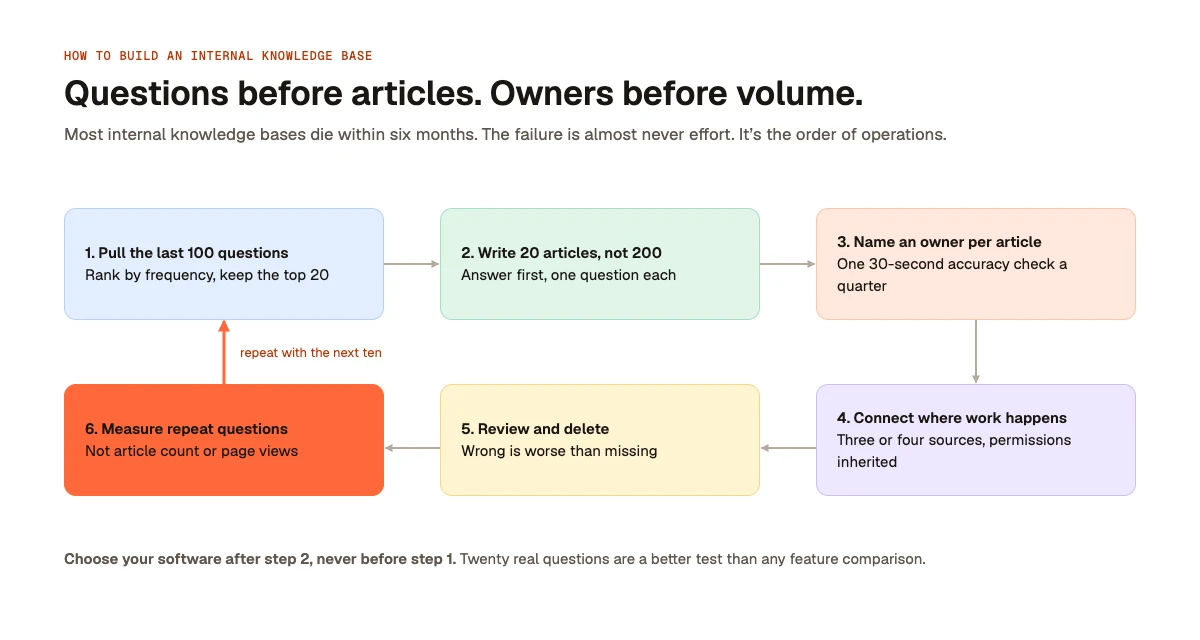
Step 1: Start With Employee Questions, Not Topics
Do not open a blank page and design a taxonomy.
Go to wherever people actually ask questions: your Slack help channel, support queue, or the direct messages your senior engineer keeps receiving. Pull the last 100 questions.
Sort them by frequency. The top 20 become your first 20 knowledge base articles. Everything else can wait, possibly forever, and that is fine.
Question frequency is the most honest signal of what deserves documentation. It also surfaces the questions nobody thinks to write down: the routine queries that the person answering them for the fifteenth time has stopped noticing are patterns.
Those are often the highest-value articles you will write.
Two things to watch:
- Use the language employees actually use. If everyone calls something "the deploy thing" and your article is titled "Continuous Integration Pipeline Overview," search may not connect the two. Title articles in the asker's language, not the owner's.
- Separate questions from requests. "How do I get access to staging?" is a documentation problem. "Can you give me access to staging?" is a permissions problem. Documentation will not solve the second. Mixing them leads to articles that cannot reduce the interruptions you are trying to eliminate.
Step 2: Write 20 Articles, Not 200
Twenty articles that answer genuinely recurring questions will beat 200 articles that attempt to cover everything. The reason is trust, not effort.
A small, accurate knowledge base teaches employees that looking things up works. A large one with stale corners teaches them that it sometimes works. In practice, they check it, get burned once, and stop.
You are not building a library. You are building a habit, and habits are destroyed by unreliability far faster than they are built by comprehensive coverage.
Format every internal knowledge base article for someone who is in the middle of a problem and slightly annoyed:
- Put the answer first. Use the first two sentences to resolve the question. Skip the preamble. If the answer is a command, show the command first.
- Add the explanation. Give readers the context they need to understand the answer, not just follow instructions.
- Cover edge cases. These often contain the most practical value, even if readers do not need them on their first visit.
Keep each article focused on one question.
The temptation is to write a comprehensive guide covering an entire system. Resist it. Comprehensive guides are written once, read rarely, and become outdated as a single unit.
Five short articles can be updated independently. Four of them staying accurate is a much better outcome than one long guide being half wrong.
If an article takes more than 30 minutes to write, the question was probably too broad. Split it into smaller pieces.
Step 3: Assign a Named Owner to Every Article
This is the highest-leverage decision in the entire process, and it is one of the most frequently skipped because it feels like bureaucracy.
"The knowledge base" cannot have a single owner. No individual can judge whether hundreds of articles across multiple domains are still accurate. Asking someone to try guarantees the answer will eventually be no.
Assign ownership at the article level. Ideally, the owner should be the person who answers that question anyway. The article exists because they kept getting asked, so they are the person most likely to know when the answer changes.
Their responsibility is simple: answer one question each quarter. Is this article still accurate?
For most articles, that takes about 30 seconds. Reviewing 20 articles across eight owners takes only a few minutes per owner, four times a year.
This turns maintenance from a project nobody has time for into a routine nobody notices.
Systems with named owners for individual articles are more likely to survive. Systems without them reliably decay, because no amount of tooling can compensate for nobody being responsible for accuracy.
One practical detail matters: if an article's owner leaves the company, flag the article immediately. Make reassigning article ownership part of your employee offboarding checklist. It takes five minutes and prevents knowledge from silently becoming outdated.
For a related perspective on the information employees carry in their heads, see our article on tribal knowledge and why it never gets written down.
Step 4: Connect the Knowledge Base to Where Work Happens
If finding an answer means leaving Slack, opening another tab, remembering which system contains the information, and searching again, employees will ask a colleague instead.
That is not laziness. Asking someone can genuinely be faster.
Your internal knowledge base needs to reach into the tools employees already use. In practice, that means two things.
Make search available where employees work.
Whether through a Slack command, browser extension, or assistant employees already use, the lookup should happen without a context switch.
A knowledge base that requires a deliberate visit gets deliberate visits only—which often means onboarding week and little else.
Search the systems where answers actually live.
Some answers live in written articles. Many more live in closed tickets, an old Slack thread, a spreadsheet, or a CRM.
A system that searches only the 20 articles you wrote is a wiki with better marketing.
This is the real difference between a wiki and a knowledge layer, and it is why connector quality matters more than connector count.
Start with the three or four sources where answers genuinely live. Connect those properly, including permissions, before adding another source. Depth beats breadth.
A connector that indexes public Slack channels but cannot retrieve information from private channels may quietly miss much of the information employees need.
Check permissions before rolling out.
Whatever you connect, confirm that it inherits existing access controls instead of requiring you to rebuild them. A system that indexes everything and answers without respecting permissions has not organised your knowledge; it has created a data leak with a search box on top.
Test it before launch using a document that should be invisible to most employees.
For more on why information gets trapped across disconnected systems, read our guide to information silos and why reorganising your tools won't fix them.
Step 5: Review the Knowledge Base Quarterly and Delete Outdated Content
Put the review on the calendar before you need it.
Every quarter, each article owner should review their content. Each article gets one of three outcomes:
- Still accurate
- Needs an update
- Should be deleted
Deletion is the step teams skip, and it is the step that keeps the system useful.
The instinct is to assume that an outdated article is better than nothing because someone might still get value from it. The opposite is often true.
A missing answer sends someone to ask a colleague, which costs a few minutes. A wrong answer sends someone confidently into a mistake, which costs considerably more and teaches them not to trust the next answer.
Wrong is worse than being absent.
If an article describes a system you no longer use, a process that has changed, or a tool you have dropped, remove it. Do not move it into a searchable folder called "Archive." That is deletion that does not work.
A few practices make quarterly reviews more likely to happen:
- Schedule recurring reviews. Assign calendar blocks to individual owners. A review that depends on someone remembering to chase everyone else will not survive a busy quarter.
- Give owners a simple list. Their job is to scan article titles and mark each one as accurate, needing an edit, or ready for deletion. Anything that requires navigating a dashboard to find their own content adds unnecessary friction.
- Track staleness, not completeness. The useful metric is the oldest unreviewed article, not the total number of articles. If nothing is older than one quarter, the system is healthy regardless of its size.
Step 6: Measure Whether Repeat Questions Decrease
Do not measure success by article count or page views.
Both metrics can increase while the knowledge base is failing. They can provide the appearance of progress without showing whether employees are finding answers.
Instead, return to the channel you used in Step 1 three months later. Count how many of your original top 20 questions are still being asked.
That number is your scorecard. It measures the problem the knowledge base exists to solve, using the same source and method every quarter.
How to interpret the results:
- Repeat questions are falling: The knowledge base is working. Write the next ten articles based on the latest frequently asked questions.
- Repeat questions are flat, but article count is rising: You are writing content people cannot find. Investigate search, discoverability, and whether article titles match the words employees actually use. Writing more will not fix a retrieval problem.
- Repeat questions are flat, and few articles have been added: The habit never formed. The launch may have been an announcement rather than an intervention. For a few weeks, respond to questions in Slack with links to the relevant articles instead of repeating the answers. It may feel awkward initially, but employees gradually learn to check first.
- Repeat questions are increasing: The business may be changing faster than the documentation. A migration, reorganisation, or new product can make existing articles inaccurate. Move to monthly reviews until things settle.
A Six-Week Plan for Building an Internal Knowledge Base
You do not need a lengthy documentation programme to get started. A focused six-week rollout can establish the foundations of a working internal knowledge base.
| Timeline | What to do |
|---|---|
| Week 1 | Collect the last 100 questions, rank them by frequency, and identify the top 20. |
| Weeks 2–3 | Write the 20 articles and assign a named owner to each one. |
| Week 4 | Connect the three highest-traffic information sources, test real queries, and verify permissions. |
| Week 5 | Soft-launch the knowledge base to the five people who answer the most questions for everyone else. |
| Week 6 | Fix what testers could not find, address search issues, and announce the knowledge base to the wider company. |
| Week 13 | Conduct the first quarterly review and compare repeat questions with the Week 1 baseline. |
Six weeks is enough to build a working system. One quarter gives you the first meaningful indication of whether it is reducing repeated questions.
If the project stalls, it will probably stall in Week 2. Writing 20 articles is the part that takes real time, and it is the part most likely to be deprioritised when something urgent arrives.
Two approaches help:
- Block time explicitly for documentation.
- Have each owner write only the two or three articles for questions they personally keep answering.
The second approach may take longer on the calendar, but it is more likely to finish. Nobody is being asked to document a system they only half understand.
Do not let Week 5 slip. The soft launch is where you discover whether search works on real queries. Skipping it and going straight to a company-wide announcement means your first impression is made on hundreds of employees, and you only get one.
How to Choose Internal Knowledge Base Software
Choose your tool last, not first.
Complete Steps 1 and 2 before evaluating software. A text file is fine to start with. Twenty real questions tell you more about what you need than any feature comparison, and they turn a vague evaluation into a concrete test:
Can this tool answer these 20 questions from our actual information sources while respecting existing permissions?
Run that test, and most shortlists will narrow quickly.
The tool matters, but it matters less than the process. Evaluate options in this order:
- Source connectivity: Can the tool retrieve information from the three or four systems where your answers actually live?
- Permission inheritance: Does it respect existing access controls without requiring you to rebuild them?
- Search accessibility: Can employees find answers without leaving the tools they already use?
Everything else—including connector counts, AI feature lists, and storage limits—is secondary until these requirements are met.
Once you have established what your team needs, compare internal knowledge base software against those requirements. Our guide to enterprise knowledge management systems explores the broader considerations involved in evaluating these systems.
From Knowledge Retrieval to Action
For some teams, finding an answer is only the first step.
Looking something up often turns into doing something: drafting a reply, updating a record, or routing a ticket. Traditional knowledge bases can help employees retrieve information, but the work often continues across other tools.
That gap between finding an answer and acting on it is what Libra's AI knowledge base is built to close.
Libra connects information and workflows to help teams move from understanding what needs to happen to taking the next step. It brings together company information so people and agents can find answers grounded in existing sources, with permissions intact.
We make Libra, so weigh that perspective accordingly. More importantly, complete the first three steps of this guide before evaluating Libra or any other tool.
The process matters more than the product.
The Bottom Line: Build a Knowledge Base People Trust
Building an internal knowledge base is not about documenting everything. It is about helping employees find reliable answers without interrupting colleagues.
Start with the last 100 questions your team asked. Write the 20 most useful articles. Give every article a named owner. Connect the sources where answers actually live, and verify that permissions carry over. Review quarterly, delete outdated information, and measure repeat questions rather than article count.
Choose your software after Step 2, never before Step 1.
The best internal knowledge base is not the biggest one. It is the one your team trusts enough to use.