What an AI Email Assistant Actually Does (and Where It Should Stop)
Discover what an AI email assistant does, how it uses context to draft replies, and where human approval should remain in the email workflow.
14 min readby Prithvi

An AI email assistant reads an inbox, works out which messages need a response, gathers the context required to write one, and drafts it — leaving the decision to send with a person. The useful ones are defined less by what they write than by where they stop.
That last clause is the whole buying decision. Every product in this category can produce a grammatical paragraph. Far fewer can tell you which source a claim came from, whether the reader was allowed to see it, and what happens when the model is not confident.
Why email is expensive and it is not the typing
Typing a reply takes ninety seconds. Knowing what to type takes considerably longer, and that is the cost nobody prices when they buy a drafting tool.
The expensive part is context reconstruction: opening four systems to rebuild a picture that existed in someone's head three weeks ago and has since decayed. The CRM holds the deal stage and the last logged activity. The project tool holds the current delivery timeline. The thread above holds what was promised in writing. The call recording holds what was promised out loud, which is frequently not the same thing.
Take a real message: "Can you confirm what we agreed on pricing?" Eleven words. A correct answer requires you to establish which pricing — list, the discount floated on a call, or the figure in the last proposal PDF. You need the proposal version that was actually sent, not the three drafts in the shared drive that look identical. You need to know whether the discount was conditional on a two-year term and whether that condition was stated aloud or written down.
You then need to check whether anything changed after the fact: a pricing update, a scope addition in the project tool, an internal note from your finance lead saying the floor moved. And you need to know what this contact is permitted to see. The procurement contact may not be the person who was given the partner rate.
That is five systems and roughly twelve minutes of reading before a single word is typed. Multiply by the twenty messages a day that need more than an acknowledgement, and email is not a writing problem. It is a retrieval problem wearing a writing problem's clothes.
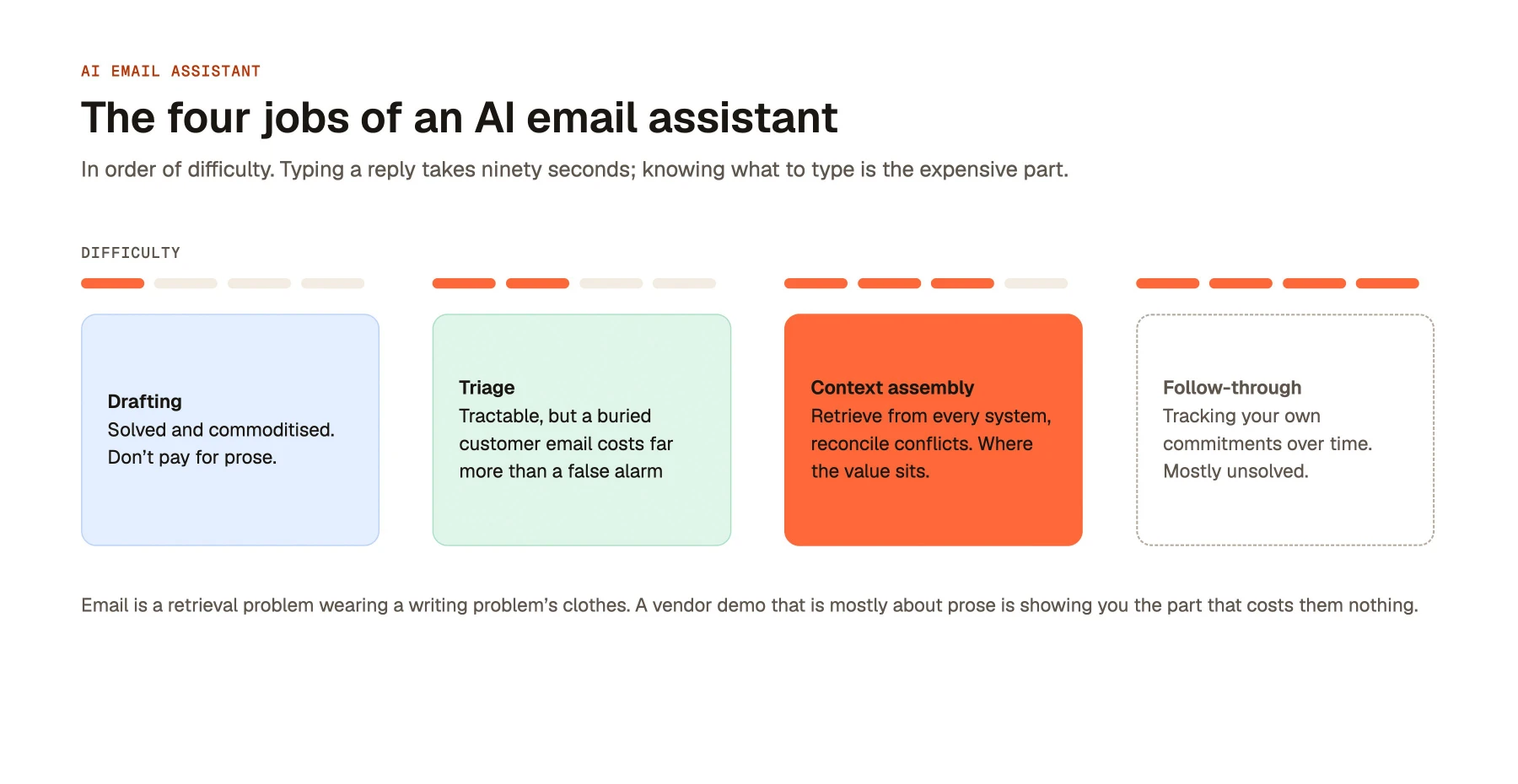
The four jobs, in order of difficulty
Drafting: solved, and now commoditised
Producing fluent, appropriately-toned English from a brief is finished technology. Any current frontier model does it well. So does the free tier of every writing tool, the compose box in Gmail, and a browser extension built by two people in a weekend.
Drafting quality is no longer a differentiator, which means it should not be a line item in your evaluation. If a vendor's demo is mostly about how good the prose is, they are showing you the part that costs them nothing. The prose was never the bottleneck — you already knew how to write the email.
Triage: tractable, and easy to get wrong in expensive ways
Triage is deciding which messages need a reply, which need a reply today, and which need nothing. Classification models handle the obvious cases well: newsletters, automated notifications, calendar noise, cold outbound.
The difficulty is asymmetric error cost. A false positive costs three seconds of a person's attention. A false negative buries a message from a customer who is about to churn, and nobody discovers it for a week. Good triage systems are tuned to over-surface rather than over-filter, and they show you what they suppressed in a reviewable list rather than deleting it silently.
Triage also depends on things that are not in the email. Whether a message matters depends on deal stage, renewal date, whether the sender is a paying customer, and whether there is an open incident. A triage system with no access to the CRM is doing sentiment analysis and calling it prioritisation.
Context assembly: where the value actually sits
This is the hard job and the one that justifies a per-seat price. The assistant has to identify what the message is asking, decide which systems hold the answer, retrieve from each, reconcile contradictions, and assemble a grounded brief before drafting anything.
Reconciliation is the part that is genuinely difficult. The CRM says £48,000. The proposal says £44,000 with a two-year commitment. The call transcript has your rep saying "we can probably work with £42". Three sources, three numbers, all technically true at different moments. A weak system averages them into confident nonsense. A strong one surfaces the conflict and says which source is most recent and most authoritative.
Doing this requires real connections into the systems where work happens — not a folder of uploaded PDFs. The practical question of which integrations an enterprise AI assistant actually needs is the same question as how good the drafts will be, because a draft can only be as grounded as the retrieval underneath it.
Follow-through: mostly unsolved
Follow-through means noticing that you promised a spec by Thursday and it is now Friday, that a thread with an open question went quiet eleven days ago, or that a customer asked twice for something they never received.
This requires tracking commitments across threads over time and reasoning about state that no single message contains. Most products do a shallow version: flagging threads with no reply after N days. That catches the easy cases and misses the expensive ones, because the costly dropped ball is usually a commitment you made, not a reply you are owed.
Treat any strong claim here with scepticism and ask to see it working on a real mailbox for a fortnight.
AI email assistant vs AI email generator
Search volume lumps these together. They are different products with different failure modes and different buyers.
An AI email generator takes a prompt and returns text. You tell it "write a polite follow-up chasing an unpaid invoice, friendly tone" and it produces exactly that. Everything it knows, you told it. An AI email assistant starts from the inbox, works out what needs answering, and retrieves the facts itself from the systems around it.
| Dimension | AI email generator | AI email assistant |
|---|---|---|
| Starting point | A prompt you write | The inbox and the thread history |
| Source of facts | Whatever you paste in | CRM, docs, tickets, calls, prior threads |
| Knows who the sender is | No | Yes — account, stage, history |
| Decides what needs a reply | No | Yes, that is the triage job |
| Permission model required | None — no company data touched | Per-user, enforced at retrieval time |
| Main failure mode | Generic, obviously templated prose | Confident, specific, wrong — or exposing data |
| Setup effort | Minutes | Weeks — connections, permissions, tuning |
| Realistic buyer | Individual, often free tier | Team or company, per-seat contract |
Generators are genuinely useful and genuinely cheap. For cold outreach, recruiting messages, or any email where the content lives entirely in your head, a generator is the correct tool and paying enterprise pricing for one is a mistake.
The distinction matters for procurement because the risk profiles do not overlap. A generator that writes a bad email wastes a minute. An assistant with read access to your CRM, your document store and your call recordings can surface something that should never have left the company. That is not a prose problem and no amount of model quality fixes it.
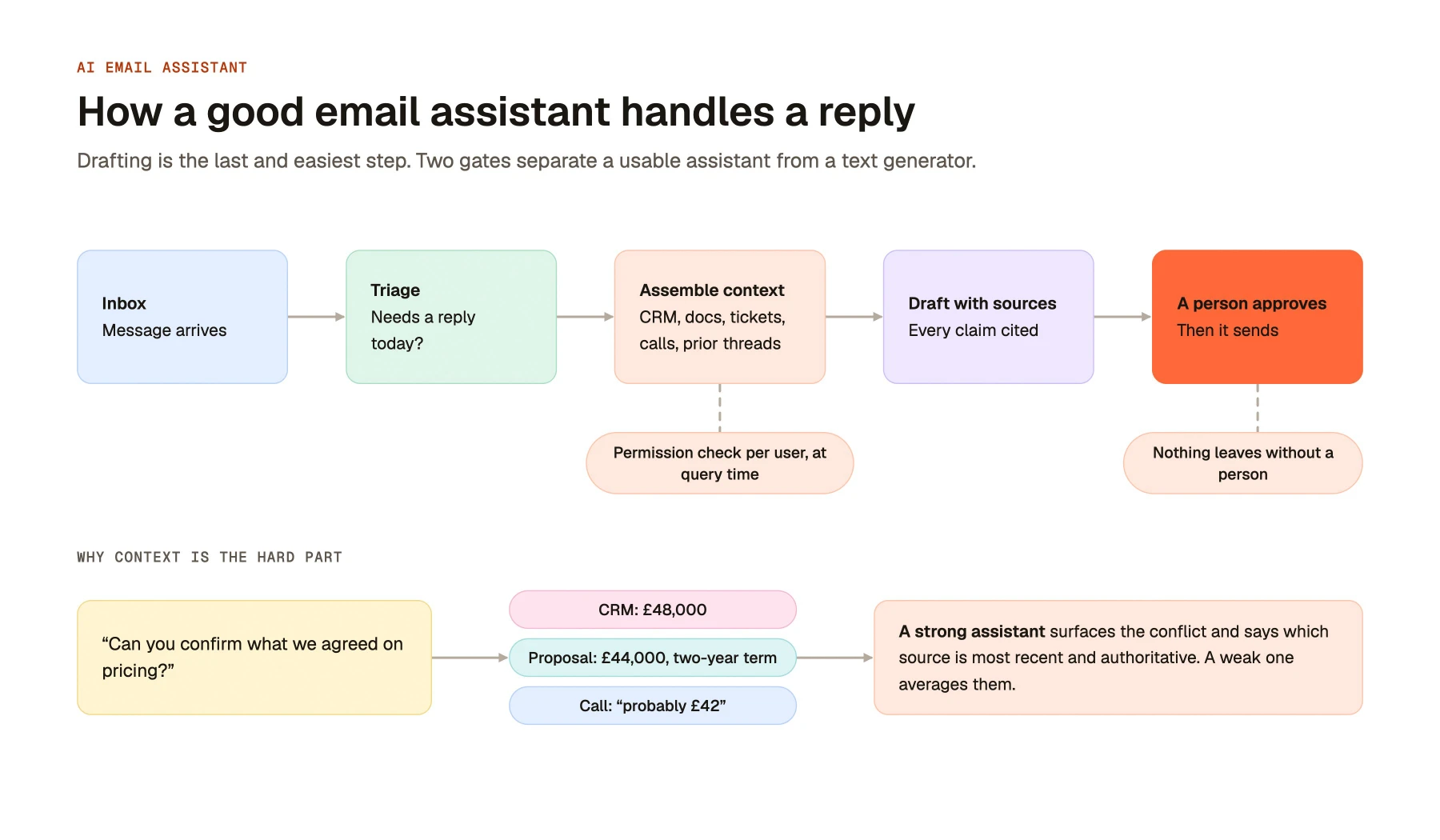
Drafting is the last and easiest step. The two marked elements are what separate a usable assistant from a text generator: every retrieval passes a per-user permission check, and nothing leaves the building without a person approving it.
Why the permission check is not optional
An email assistant that assembles context across company systems is a retrieval system with a writing surface attached. Every property that makes enterprise search dangerous applies here, plus one more: the output has an addressee.
The common architecture is an index. The system crawls your document store, CRM and ticketing tool, embeds the content, and stores it with a snapshot of who could see each item at crawl time. Queries run against that index. It is fast and it is cheap, and it is wrong within hours of being built.
Permissions drift constantly. A folder is restricted to the exec team on Tuesday; the index still carries Monday's access list. An employee moves from sales to support and loses access to commission data, but the index remembers the old group membership. A contractor's account is deprovisioned on their last day while their documents remain indexed under a stale entitlement. A document is shared into a private channel and inherits tighter permissions the crawler will not revisit until the next full pass, which may be weekly.
In enterprise search, a stale entitlement produces a bad outcome that is at least contained: someone sees a result they should not have seen. Unpleasant, recoverable, and visible only inside the building.
In email, the same failure has an exit path. The restricted content is not displayed in a results list ,it is woven into a draft, in the assistant's own confident voice, addressed to someone outside the company. The reviewer sees fluent prose that reads as if it came from a colleague. They do not see a source label saying "retrieved from the board folder". They skim, they approve, they send. The paragraph that leaves is indistinguishable in tone from the four around it, which is precisely why it survives review.
The correct architecture checks permissions at query time, against the source system, for the specific user, on every retrieval. That is slower and more expensive to build, which is why it is not the default. The reasoning behind permission-aware access control for enterprise AI applies to every retrieval path, and the email surface is the one where a mistake travels furthest.
The one question to ask a vendor: "When your assistant retrieves a document to draft a reply, is the permission decision made against your index or against the source system, at that moment, for that specific user?" A real answer names the mechanism and the latency cost. An evasive answer talks about SOC 2, encryption at rest, and how permissions are "respected" and "synced".
Sync frequency is the admission. If the answer contains an interval, the index is the authority, and the interval is your exposure window.
Where it should stop
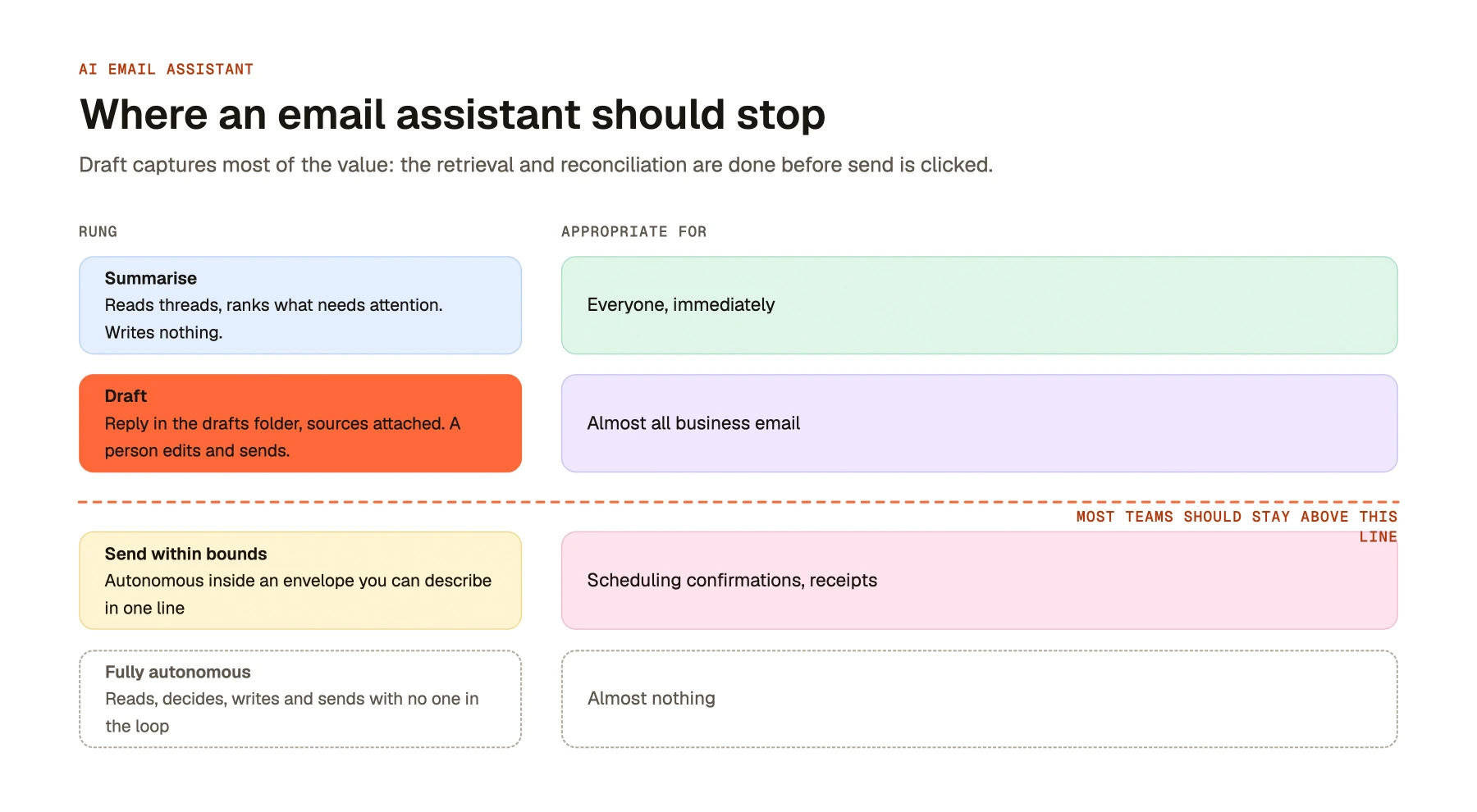
| Rung | The assistant | Appropriate for |
|---|---|---|
| Summarise | Reads threads, extracts open questions and commitments, ranks what needs attention. Writes nothing. | Everyone, immediately. No approval workflow needed, no outbound risk. |
| Draft | Assembles context, produces a reply in the draft folder with sources attached. A person edits and sends. | The default for almost all business email. Where most teams should settle permanently. |
| Send within bounds | Sends autonomously inside a narrow, explicitly defined envelope — scheduling confirmations, receipt acknowledgements, status replies drawn from one system of record. | High-volume, low-variance, low-stakes categories with a named owner and a full audit log. |
| Fully autonomous | Reads, decides, writes and sends across the whole inbox with no human in the loop. | Almost nothing. Marketing copy for this rung outpaces deployed reality by a wide margin. |
Most teams should stay on the first two rungs indefinitely, and that is not timidity. Rung two captures the overwhelming majority of the value, because the expensive work — retrieval, reconciliation, knowing what to say has already happened by the time the draft exists. Clicking send costs nothing and returns full control.
The economics of moving to rung three are also worse than they look. The gain is a few seconds per message. The exposure is every message the system misjudges, sent under your domain, to your customers, with no opportunity to intercept. You are trading a small recurring saving for a small probability of an unbounded loss.
There is a subtler cost. Review is where people notice the assistant is wrong. Teams that stay on rung two build an accurate sense of when to trust it and when to check the source. Teams that jump to autonomy skip that calibration and find out about the failure from the recipient.
Where rung three does work, it works because the envelope is narrow enough to describe on one line: "confirm meeting times against the calendar, no other content, only to addresses already in the thread." If you cannot write that sentence for a category, it does not belong on rung three.
What to look for when evaluating one
"Where does the permission decision happen?" Covered above, and the single highest-value question in an evaluation. A real answer describes query-time checks against source systems and acknowledges the latency this adds. Anything involving a sync interval means the index is authoritative and stale by design.
"Can I see which sources produced this draft, sentence by sentence?" A real answer is a working citation panel: this claim came from this CRM field, that date from that project record, this figure from a proposal dated 14 March. Without it, review means verifying every fact independently, which costs more than writing the email yourself. Source attribution is what makes a draft cheaper to check than to write.
"What does it do when it does not know?" A real answer is a visible gap — a flagged placeholder, a note saying the pricing could not be confirmed from any connected system. The wrong answer is a plausible number. Ask to see a deliberately under-specified case in the demo, using their data, and watch whether the model invents or abstains.
"Which systems does it read, and how deeply?" "We integrate with Salesforce" can mean full object-level read with field permissions honoured, or it can mean account names and nothing else. Ask which objects, which fields, how often they refresh, and what happens to a record updated ninety seconds ago. Depth of integration sets the ceiling on draft quality.
"Is our email content used to train models?" A real answer is unambiguous and contractual: no training on customer data, stated in the agreement, with sub-processors named and retention periods specified. Push past the marketing page to the DPA. Also ask what is logged, where, and for how long — prompt and completion logs are email content by another name.
"Can this run inside our own environment?" For regulated industries and anyone whose inbox contains client-privileged material, cloud-only is a hard stop rather than a preference. Ask whether deployment in your own cloud is supported, whether it is the same product or a reduced build, and who is responsible for updates. Vendors that only ever ship multi-tenant SaaS will describe this as unnecessary, which is a statement about their architecture.
"What does the audit trail contain?" You want, per draft, which documents were retrieved, under whose identity, what was generated, who approved it, what they changed, and when it sent. That record is what makes an incident investigable. If audit logging is a roadmap item, the product is not ready for an inbox that handles customer data.
What good looks like in practice
A working setup is undramatic. Overnight, the assistant reads everything that arrived, classifies it, and assembles context for anything needing a substantive reply. Nothing is sent. Nothing is deleted.
At 8am a person opens a short list. Six messages need a real reply, each with a draft attached and sources cited beside every factual claim. Eleven are acknowledgements or scheduling and have one-line drafts. Forty are noise, grouped and collapsed, still reachable in one click.
Review of the six takes ten to fifteen minutes. Four are sent with light edits. One is rewritten because the relationship needs a tone the assistant cannot judge. One is wrong — the assistant used a superseded proposal, and the citation makes that visible in about four seconds, which is the entire point of the citation.
Over a month, two patterns emerge. The drafts get better in categories that recur, because the corrections are consistent. And the team develops accurate instincts about which claims to verify: anything involving a number, a date or a commitment, always.
Libra WorkBase approaches this as a workspace layer rather than an inbox add-on. The email assistant shares its retrieval layer with the knowledge base, meeting assistant and agents, so a draft can cite a call transcript and a CRM record in the same paragraph, with a per-user permission check on every retrieval. It deploys in our cloud, your VPC, or fully self-hosted, and is sold by team rather than by seat.
Common failure modes
Fluent but wrong. The draft reads perfectly and contains a figure that was superseded in February. Fluency is uncorrelated with accuracy, and reviewers calibrate trust on fluency because that is what humans do. The only structural defence is source attribution that makes verification a four-second glance rather than a five-minute investigation.
Surfacing restricted content. The assistant retrieves from a document the sender's account team could see but this particular reader cannot, and the fact ends up in an outbound draft. Index-time permissions are the usual cause. The failure is silent, discovered externally, and cannot be recalled once sent.
Over-triage. Tuned for a clean inbox, the system suppresses an unfamiliar sender who turns out to be a customer's new general counsel. Nobody notices for nine days. Any triage layer needs a reviewable suppressed list and a bias towards surfacing; the cost of one buried message dwarfs the cost of a hundred unnecessary ones.
Everything rewritten from scratch. If your team discards every draft, the instinct is to blame the model. It is almost always a context problem. The assistant is not connected to the CRM, or it cannot read the shared drive where proposals live, or it has no access to call recordings. A model writing without facts produces generic prose because generic prose is all that is available to it. Audit the connections before evaluating a different vendor.
Buying an assistant when you needed a generator. If your email is mostly outbound, mostly cold, and mostly from your own head, there is no context to assemble. A generator at a fraction of the price does the job. Retrieval infrastructure only pays for itself when the answers already exist somewhere in your systems.
Frequently Asked Questions
An AI email assistant is software that reads an inbox, identifies which messages need a response, retrieves the context required to answer them from connected systems such as a CRM, document store and prior threads, and produces a draft reply.
An AI email generator turns a prompt into text, you supply the facts, it supplies the wording. An AI email assistant starts from your inbox, decides what needs a reply, and retrieves the facts itself from connected business systems.
Technically yes; most should not be configured that way. The recommended setting leaves every draft for human review before sending. Some teams enable autonomous sending for narrow, low-variance categories such as scheduling confirmations, with strict bounds and full audit logging.
It depends entirely on the vendor, and the answer belongs in your contract rather than on a marketing page. Reputable enterprise vendors state contractually that customer content is not used for model training, name their sub-processors, and specify retention periods.
Serious products support both, since Microsoft 365 and Google Workspace cover almost all business email. Check how deep the integration goes: whether drafts appear natively in the client or only in a separate web app, whether shared and delegated mailboxes are supported, and whether calendar and contacts are read as well.
Microsoft 365 Copilot is strong inside Microsoft data and priced at $18 per user per month on an annual commitment. Its context is largely what lives in Microsoft 365. A dedicated assistant is usually chosen when the facts needed for replies sit outside that boundary, in a non-Microsoft CRM, a support desk, or call recordings or when self-hosted deployment is required.