AI Workflow Automation: How It Differs From Rule-Based Automation
Learn how AI workflow automation differs from traditional workflow automation software, when to use each, and how AI workflows handle unexpected cases.
12 min readby Prithvi

AI workflow automation uses a model to decide what happens next in a process, rather than following a sequence someone defined in advance. Traditional automation executes a fixed path: when this trigger fires, run these steps in this order. AI workflow automation is given an outcome, works out the steps, and changes them when the situation does not match what was expected.
That difference is one line in a diagram. It changes what you can automate, how it fails, and who watches it.
Most processes do not need it. The ones that do share a shape: high input variety, a stable definition of done, and a rule set that grows without ever reaching full coverage.
What rule-based workflow automation does well
Deterministic automation is the right answer more often than vendor marketing suggests. The same input produces the same output on every run, forever. A step executes in milliseconds for a fraction of a cent, and a new analyst can predict its behaviour without running it.
Zapier covers the long tail of SaaS-to-SaaS triggers across thousands of integrations with no engineering involvement. Workato handles enterprise recipes with error handling and governance attached. Power Automate is already paid for inside a Microsoft estate. This kind of workflow automation software is underused, not overused.
Invoice routing. An invoice lands in the accounts payable inbox and OCR extracts vendor, amount and PO number. PO matches and under £5,000: post to the ERP as approved. £5,000 to £50,000: the cost-centre owner on the PO. Above £50,000: CFO plus a second approver. No PO, or an unapproved vendor: exception queue. Thousands of runs a month, near-zero variance.
New-hire provisioning. An HRIS record appears with a start date, department and manager. That fires group membership, an identity provider account, a laptop order against the standard build for the role, payroll enrolment, a day-one calendar series and Slack joins. Forty steps derived from three fields, with no judgement anywhere.
Closed-won handoff. An opportunity moves to Closed Won. That creates an onboarding project from a template keyed to the product SKU, assigns a CSM by territory, copies contract term and renewal date onto the account, and schedules a kickoff. Every input is already a structured field.
If your process looks like one of these, build it in a rule engine and stop reading. A model where a switch statement works costs orders of magnitude more per run and turns a correct deterministic system into a usually-correct one.
Workflow automation software: the current landscape
The workflow automation software market is four categories discussed as one. Most companies run three without an inventory of what runs where.
iPaaS moves data between SaaS systems — Zapier, Make, Workato, Tray, MuleSoft. The connector catalogue is the product, and depth on the objects you need matters more than the headline app count, which is why which connectors actually matter belongs in the evaluation, not the rollout.
Embedded SaaS automation is the builder inside a system you already pay for: Salesforce Flow, HubSpot Workflows, ServiceNow Flow Designer, Jira Automation. Free with the seat, and correct whenever a process begins and ends in one platform.
RPA — UiPath, Automation Anywhere, Blue Prism — drives the user interface of systems with no usable API: mainframe terminals, desktop applications, on-premise finance software. It breaks when someone moves a button.
Orchestration is engineer-owned: Airflow, Temporal, Dagster, Prefect. Long-running state, retries, idempotency, dependency graphs — not for business users, and not to be sold as such.
| Category | Examples | Best for | Where it breaks |
|---|---|---|---|
| iPaaS | Zapier, Make, Workato | Cross-system data movement | Shallow custom-object coverage |
| Embedded SaaS | Salesforce Flow, HubSpot | Processes inside one platform | Anything leaving it |
| RPA | UiPath, Blue Prism | Legacy systems with no API | UI changes and pop-ups |
| Orchestration | Airflow, Temporal | Stateful engineered pipelines | Business users cannot maintain it |
Where the rules run out
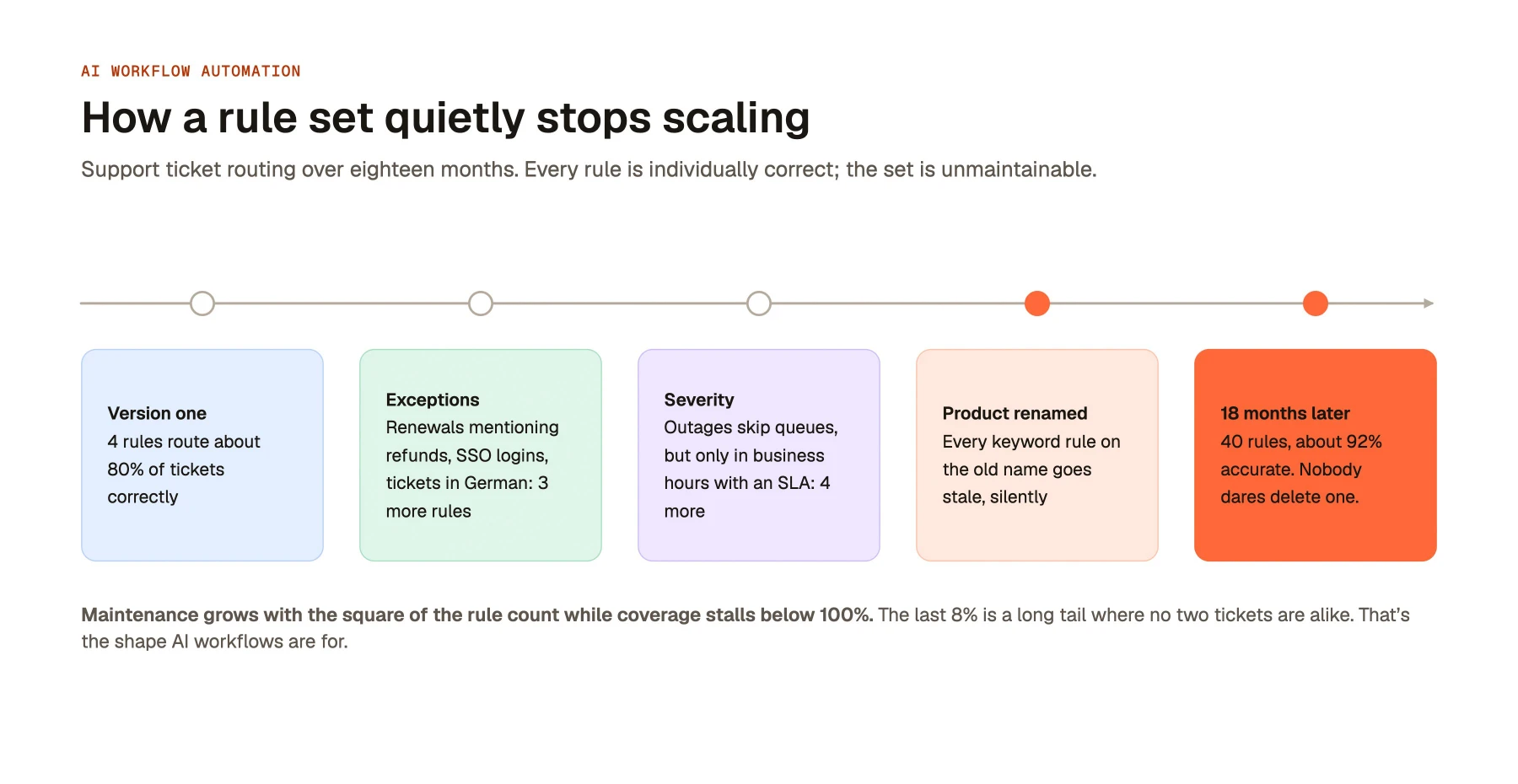
Rule sets do not fail at the start. They fail through accumulation, and the failure is quiet.
Take support ticket routing. Version one has four rules. Body contains "refund", go to billing. Contains "password" or "cannot log in", go to identity. Tier is Enterprise, go to the named CSM. Everything else, tier-one queue. It routes roughly 80% of tickets correctly.
Then the exceptions start. An enterprise renewal thread mentions a refund and lands in billing instead of with the account team, so tier has to beat keyword. An SSO customer writes "cannot log in", but the fault is an identity provider misconfiguration owned by solutions engineering. Tickets arrive in German. Three more rules.
Then severity. "Outage" and "down for all users" should skip queues entirely, but only during business hours in the ticket's region, and only for accounts with an SLA. Four more rules, and a precedence question against the three you just wrote.
Then the product is renamed and every keyword rule using the old name goes stale, silently. Then a customer writes "the thing where I click and nothing happens", which matches nothing.
Eighteen months later there are 40 rules and accuracy has moved from 80% to about 92%. Every rule is individually correct; the set is unmaintainable. Evaluation order carries meaning nobody wrote down, and nobody deletes a rule because nobody can prove what depends on it. Maintenance cost grows with the square of the rule count while coverage stalls below 100%. The residual 8% is a long tail where no two tickets are alike.
The control loop is the actual difference
Both kinds of automation have a trigger, steps and an output. Drawn as control flow, the difference is a single edge. A rule-based workflow runs trigger, match, execute, done, and exits to a person when nothing matches. An AI workflow observes, plans, acts, observes the result, then plans again with that result as new input. That loop is what handles an input nobody anticipated, and it is the same loop underneath how autonomous AI agents work.
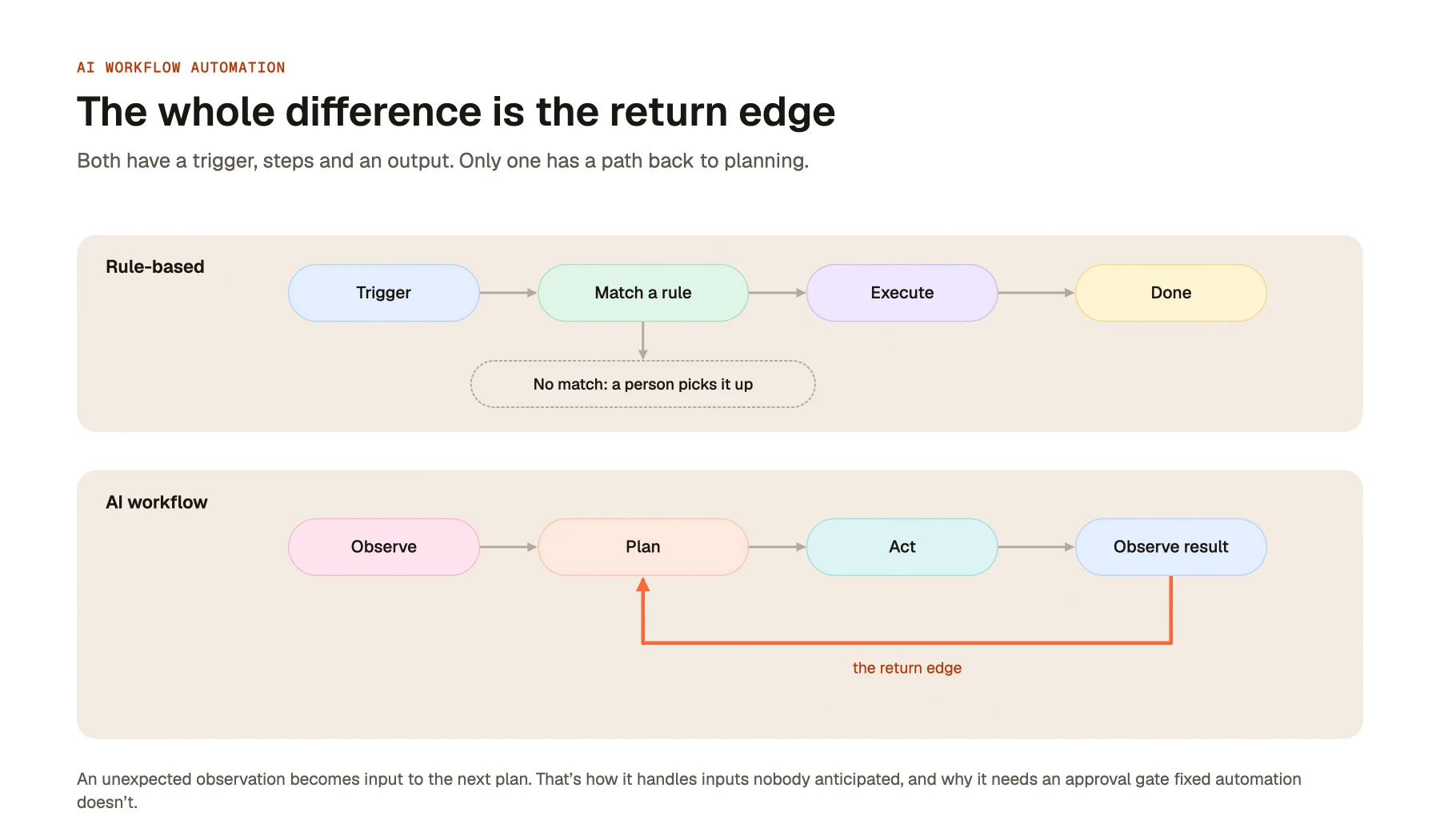
The whole difference is the return edge. A rule-based workflow has no path back to planning, so an unmatched input ends the run and a person picks it up. An AI workflow treats an unexpected observation as input to the next plan which is also why it needs an approval gate that fixed automation does not.
Rule-based vs AI workflow automation
| Rule-based | AI workflow automation | |
|---|---|---|
| Defined by | An author, in advance, as explicit ordered steps | An outcome, plus tools, context and boundaries it plans within |
| Handles | Inputs matching an anticipated case | Inputs resembling the goal, including unseen shapes |
| On an edge case | Falls through to an exception queue | Attempts a plan — sometimes right, sometimes confidently wrong |
| Output | Byte-identical for identical input, every run | Varies run to run; correct in substance, not in form |
| Fails by | Stopping, loudly and visibly | Continuing, quietly and plausibly |
| Oversight | Test once; revisit when upstream changes | Sampled review, evaluation sets, approval gates |
| Best for | High volume, low variety, regulated | High variety, unstructured input, judgement steps |
Two rows carry the practical weight. The first is how each fails. A rule-based workflow that meets an input it cannot match stops, and the record sits in a queue with a timestamp. The cost is delay, and detection is free — somebody watches the queue grow. An AI workflow answers anyway: a confident category, a summary of a clause the contract does not contain. Detection is not free. You pay in sampled review, or you pay when a customer tells you.
That inverts the design brief. You engineer on the assumption that some outputs will be wrong and will not look wrong. A workflow at 94% accuracy with no review is worse in practice than one at 88% that flags low-confidence cases to a person. What matters is whether an error is detectable and reversible before it reaches a customer or a ledger.
Oversight is the second row, and it is a running cost rather than a launch task. A rule written today behaves identically in two years. A model workflow drifts as inputs shift, and changes behaviour outright on a model upgrade. Budget roughly a fifth of an FTE per production workflow for six months. Chaining several of these loops, which is what agentic process automation describes, multiplies that cost rather than amortising it.
How to tell which one a process needs
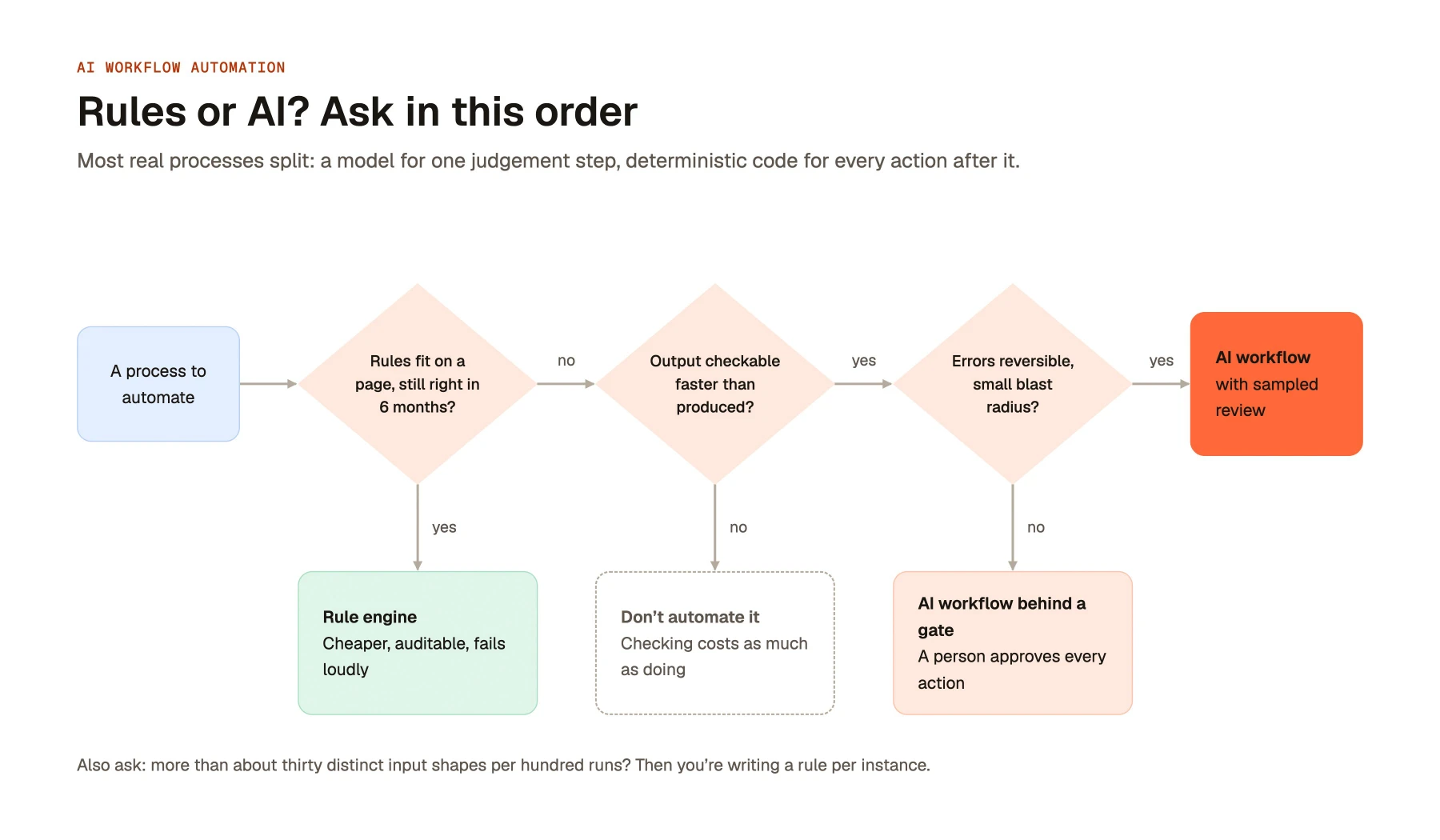
Can you write the rules down in under an hour, and will they still be right in six months? If the logic fits on a page and the policy behind it is stable, use a rule engine. Stability is what makes rules cheap. Example: routing purchase requisitions by spend threshold and cost centre, where thresholds change once a year.
How many distinct input shapes arrive per hundred runs? Count genuinely different forms, not volume. Under about ten shapes, rules cover them; over thirty, you are writing a rule per instance. Example: expense receipts have six shapes and suit a rule engine; inbound vendor security questionnaires are different every time.
Is the output checkable in less time than it takes to produce? If a reviewer can verify it in under a minute against a source, a model workflow is safe behind a gate. If verification costs as much as the work, automating it buys nothing. Example: "extract the liability cap from this MSA" is checkable in seconds; "decide which accounts are at risk and email them" is not.
What does being wrong 5% of the time cost? You choose an error rate you can tolerate rather than eliminating it. Reversible, low-blast-radius errors are fine. Example: a mis-tagged CRM note costs a minute to fix; a refund to the wrong account cannot be recalled and belongs behind approval regardless of measured accuracy.
Most real processes split. The classification step is model-shaped; everything downstream is rule-shaped. The strongest designs use a model for one judgement and deterministic code for every action after it.
What an AI workflow needs to actually work
Context. The model needs what a competent new joiner would need: the last six months of tickets on the account, the signed contract, the escalation policy, who owns the integration. Most failures blamed on reasoning are missing context instead. A mid-tier model holding the right three documents beats a frontier model holding none.
Permissions enforced at retrieval, not at index. Index-time permissions snapshot access control lists at ingestion and filter against that snapshot, which is wrong within days. People leave deal teams, documents get restricted, an employee moves departments. Retrieval-time enforcement re-evaluates the asking user's live entitlements in the source system before any chunk is returned, on every query.
Get it wrong and the failure is worse than an ordinary leak: the model quotes the compensation spreadsheet or the unannounced acquisition memo fluently, stripped of the file path and sharing banner that would have warned the reader. No access log entry exists either, because the document was never opened. Permission-aware access control is an architectural decision taken before the pilot, not a hardening step after it.
Defined boundaries. Write down which tools the workflow may call, what it may write to, what it may spend, and which actions need a human signature — then enforce it in the tool layer, not the prompt. A prompt instruction is a request; a permission check in the execution layer is a control, and only one survives an unusual input. Default to read-only, add internal write access once the error rate is measured, and keep a hard gate on anything customer-facing or financial.
An audit trail. Every run should record the input, the retrieved context with source identifiers, the plan, each tool call with its arguments, the output, and the approving human. Without it you cannot debug a decision, answer an auditor, or build the evaluation set you need at the first model upgrade. Most teams add this after their first bad incident. Add it in week one — cheap then, impossible retroactively.
How to implement one
- Pick the process. Look for at least 200 runs a month, an owner who feels the pain, reversible outcomes, and past decisions you can score against. Do not start with the most visible process, but with the one where being wrong costs somebody ten minutes.
- Run shadow mode. The workflow reads live input, produces a full output and takes no action. Humans keep working. Compare the two for four to six weeks or 500 runs, whichever comes first. This usually reveals that the documented process and the real one diverged years ago.
- Define the boundary. Use shadow data to pick the narrow slice the workflow handles unattended, written as an explicit rule. A realistic first boundary: auto-route the 60% of tickets in the three categories where shadow agreement exceeded 95%, and attach a suggested route to the rest for a person to accept.
- Instrument it. Five numbers, reviewed weekly for the first quarter — see the table below.
- Expand one dimension at a time. Widen the slice, add a tool, or lengthen the chain — never all three at once, or you cannot attribute a regression. Re-run the evaluation set after every model change. Scaling to a portfolio of enterprise AI agents is a governance problem by then, not a modelling one.
| Metric | How to measure | When to act |
|---|---|---|
| Agreement rate | % of runs matching the human decision | Below 85% in a category — take it out of scope |
| Escalation rate | % of runs handed to a person | Rising month on month — inputs shifted |
| Reversal rate | % of unattended actions undone within 7 days | Above 2% — the boundary is too wide |
| Cycle time | Trigger to resolved, end to end, not model latency | Flat — you automated the wrong step |
| Cost per run | Tokens, tool calls and review minutes | Above the human baseline — review minutes get omitted |
Common mistakes
Using a model where a switch statement works. If the decision is a function of structured fields already on the record, branch on them. A model call costs hundreds of times more and adds variance to a step that had none.
Automating the documented process instead of the real one. The SOP describes what the process was designed to be. The team has worked around it for two years, routing past a broken approval step and using a shared inbox nobody owns. Build from what shadow mode shows.
Treating prompt text as a guardrail. "Never email a customer without approval" in a prompt is a suggestion that holds until an unusual input. If an action must not happen, the workflow must not hold the credential for it.
Deploying without an evaluation set. Without 100 to 300 labelled examples from your own history, you cannot tell whether a model upgrade improved the workflow or quietly degraded it on the cases you care about.
Never defining exit criteria for the human gate. Write down in advance what would justify removing review — say, 1,000 consecutive runs with a reversal rate under 1%. Without a number, the gate either stays forever and eats the savings, or goes because someone got impatient.
Libra WorkBase covers the four requirements above, a knowledge base with permission-aware retrieval, agents, workflows and an audit trail, deployable in cloud, VPC or fully self-hosted. Assemble it or buy it; the requirements do not change.
Keep reading
Frequently Asked Questions
AI workflow automation uses a model to decide the next step in a process, rather than following a predefined sequence. You give it an outcome, the tools it may use, and the boundaries it must stay inside. It plans the steps, observes what happens, and adjusts when reality does not match the plan.
Rule-based automation runs a fixed path defined in advance, and stops when an input matches nothing. AI workflow automation plans its own path and attempts an answer regardless. The consequence is the failure mode: rule-based systems fail loudly and visibly, while AI workflows fail quietly by producing plausible but wrong output, so they need sampled review.
Avoid it when the decision depends only on structured fields, when the rules fit on one page and rarely change, when output cannot be verified faster than it was produced, or when an error is irreversible. Regulated processes needing identical output for identical input should stay deterministic. A switch statement is cheaper and auditable.
No. Rule engines and iPaaS platforms still execute the actions — creating records, moving data, provisioning accounts, because deterministic execution is what they are good at. What changes is that a judgement step which previously needed a human handoff can sit inside the chain. The two are complementary, not competing.
Budget around a fifth of a full-time role per production workflow for the first six months. That covers sampled review of unattended decisions, an evaluation set of 100 to 300 labelled examples, and re-testing after every model or prompt change. Oversight is a permanent running cost, not a launch task.