Knowledge-Based Software: What It Is & How It Works
Learn what knowledge-based software is, how it works, how it differs from traditional software, and how businesses use AI to turn company knowledge into action.
6 min readby Prithvi

Knowledge-based software is software that uses structured or unstructured knowledge to help people make decisions, answer questions, complete tasks, or execute workflows.
Traditional software primarily follows rules defined in advance:
Input → rules → output
Knowledge-based software adds a layer of organizational knowledge:
Input → knowledge → reasoning → action
That knowledge can come from documents, databases, policies, previous interactions, business processes, internal systems, and other sources of company context.
With modern AI, knowledge-based software can go one step further. Instead of simply retrieving information, it can interpret that information and use it to complete work.
For example, an employee asking: "Can we approve this customer's refund?"
might traditionally need to search a policy document, check the customer's account, review the transaction, and ask someone in finance.
Knowledge-based software can bring those pieces together, determine which policy applies, and recommend or execute the appropriate action.
That shift is particularly important as businesses move from AI that answers questions to AI that gets work done.
How does knowledge-based software work?
A modern knowledge-based system generally has four layers.
1. Knowledge sources
The system first needs access to the information it is expected to use.
This might include:
- Company policies
- Product documentation
- Employee handbooks
- Contracts
- Customer records
- CRM data
- Financial information
- Support tickets
- Project documentation
- Databases
- Spreadsheets
- Internal wikis
The important point is that knowledge doesn't have to live in one database.
In a real organization, useful context is usually scattered across many systems.
2. Knowledge retrieval
When someone asks a question or starts a workflow, the software needs to identify the information that actually matters.
For example: Customer asks for a refund
The relevant knowledge might include:
- Refund policy
- Customer's purchase history
- Product type
- Payment status
- Previous refund requests
- Customer tier
A useful system doesn't simply retrieve everything.
It retrieves the right context for the task.
3. Reasoning
This is where AI changes the model.
Instead of simply searching for a paragraph containing the answer, an AI system can interpret multiple pieces of information together.
For example:
The customer bought the product 18 days ago.
The refund policy allows returns within 30 days.
The product is eligible.
The customer has not previously requested a refund.
The system can reason that the request meets the relevant conditions.
4. Action
The final layer is what separates knowledge-based software from a traditional knowledge base.
Instead of stopping at: "This customer appears eligible for a refund."
the system can potentially:
- Verify the transaction.
- Create the refund.
- Update the CRM.
- Notify the customer.
- Record the decision.
This is where knowledge becomes operational.
Knowledge base vs. knowledge-based software
These terms are often used interchangeably, but they're not the same.
A knowledge base stores information.
Knowledge-based software uses information to perform a task.
For example:
| System | What it does |
|---|---|
| Knowledge base | Stores refund policies |
| Search engine | Finds the refund policy |
| AI assistant | Explains the refund policy |
| Knowledge-based software | Determines whether a specific refund qualifies |
| AI agent | Determines eligibility and executes the refund workflow |
The progression is important.
The goal isn't simply to give AI access to more documents.
The goal is to give software enough context, reasoning, tools, and permissions to complete useful work.
Examples of knowledge-based software
Customer support
A support system can combine:
- Customer history
- Product documentation
- Pricing information
- Policies
- Previous conversations
It can then determine how an issue should be handled.
Instead of an agent manually searching five systems, the software assembles the relevant context automatically.
Finance
Finance teams can use knowledge-based systems to interpret:
- Expense policies
- Vendor information
- Invoices
- Approval rules
- Financial records
The system can identify exceptions and route them appropriately.
HR
An employee might ask: "Can I work remotely from another country for three weeks?"
Answering this could require checking:
- Remote work policy
- Country restrictions
- Employment rules
- Team requirements
- Existing approvals
A knowledge-based system can gather the relevant information before producing an answer or initiating an approval workflow.
Sales
A sales system can combine:
- Account information
- CRM history
- Previous conversations
- Product documentation
- Pricing rules
- Customer industry
The result is more than a generic AI-generated email.
It is an action informed by the company's actual knowledge.
What makes AI-powered knowledge software different?
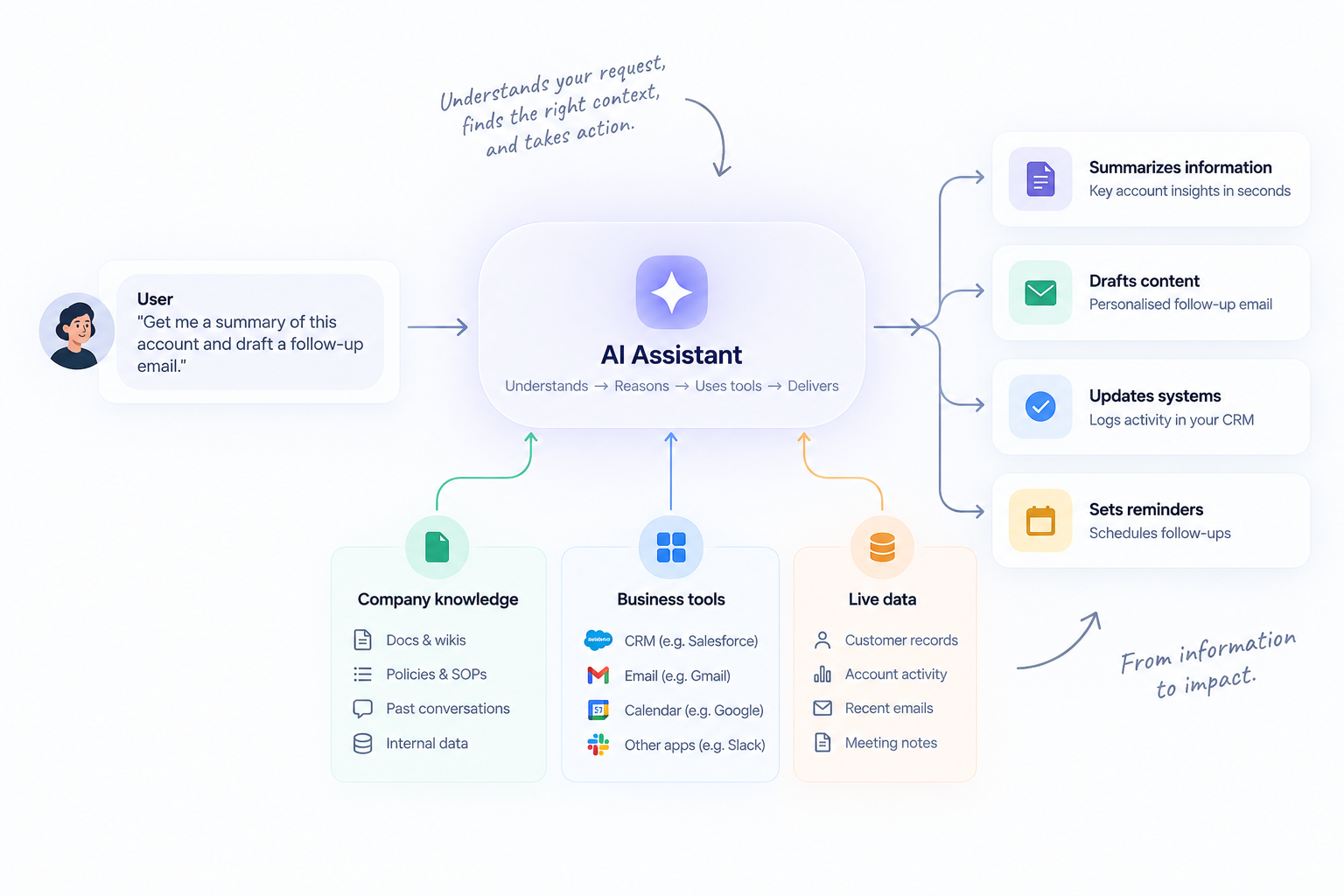
Traditional knowledge management assumes that humans will do the work of interpretation.
AI changes that. Instead of:
Find → read → understand → decide → act
you can build:
Retrieve → reason → decide → act
This is especially powerful for processes where employees repeatedly need to interpret the same types of information.
The software can become an operational layer over the company's knowledge.
Knowledge-based software and AI agents
AI agents are a natural evolution of knowledge-based software.
An agent doesn't just retrieve knowledge. It can use knowledge as part of a larger workflow.
For example:
Goal: Process a new customer application.
An agent could:
- Retrieve the customer's application.
- Check company policies.
- Pull information from internal systems.
- Identify missing information.
- Evaluate the application.
- Update the relevant system.
- Escalate exceptions to a human.
The knowledge is what allows the agent to make context-aware decisions.
The tools and integrations are what allow it to act.
When should a business use knowledge-based software?
Knowledge-based software is particularly useful when:
- Information is spread across multiple systems.
- Employees repeatedly search the same documentation.
- Decisions depend on company-specific policies.
- Processes involve large amounts of unstructured information.
- Employees spend significant time gathering context before acting.
- The same decisions are being made repeatedly.
- Business knowledge changes frequently.
It is less useful when a workflow is completely deterministic and can be handled by a simple rule or traditional automation.
Not every problem needs AI.
The best candidates are usually processes where context and interpretation matter.
How to build a knowledge-based system
Start with the workflow, not the model.
Ask:
1. What decision or task are we trying to improve?
Don't start with "How can we use AI?"
Start with: "What work currently requires people to search for information and make repetitive decisions?"
2. What information does the person need?
Map every source involved.
3. What decisions need to be made?
Identify the rules, policies, and judgment involved.
4. What systems need to be accessed?
Determine where the agent needs read or write access.
5. Where should humans remain involved?
Not every decision should be autonomous.
High-risk or irreversible actions should generally have appropriate approval and escalation mechanisms.
The future of knowledge-based software
The biggest shift is that company knowledge is becoming executable.
Historically, businesses stored knowledge in:
- Documents
- Wikis
- SOPs
- Databases
- Training manuals
Employees then used that knowledge to perform work.
AI makes it possible to embed that knowledge directly into software workflows.
The result is a new category of business software that doesn't simply tell employees what to do.
It can understand the context, determine what should happen, and help execute the work.
That's the foundation for the next generation of AI-powered operations.
Want to turn company knowledge into action?
Explore how Libra's AI agents can connect company knowledge, business systems, and workflows →