Support Knowledge Base Software: How to Choose in 2026
Compare support knowledge base software for customer self-service and internal agent support, including Zendesk, Intercom, Freshdesk, Document360, Guru, Notion, and Libra.
7 min readby Prithvi

Support knowledge base software has to serve two audiences that want opposite things. Customers want a short answer to one question. Agents want the edge cases, the escalation path and the thing the article does not say out loud. Most tools are built for one of those audiences and retrofitted for the other, and the retrofit is where support teams get stuck.
This guide covers the tools, the split between internal and external knowledge, and the failure mode that no feature list warns you about. For the conceptual grounding, start with what a knowledge base is.
The split that determines everything
Before comparing vendors, decide which of these you are buying. The answer changes the shortlist entirely.
| Customer-facing help centre | Internal agent knowledge | |
|---|---|---|
| Audience | Customers, self-serve | Agents, mid-conversation |
| Success metric | Deflected tickets | Time to accurate answer |
| Content style | Short, complete, evergreen | Dense, caveated, situational |
| Failure mode | Nobody finds it | Agents keep asking in Slack |
| Lives naturally in | Help desk suite | Internal knowledge layer |
Teams that try to serve both from one corpus usually end up serving neither. Customer-facing articles get cluttered with internal caveats, or internal knowledge gets sanitised until it stops being useful. The workable pattern is two corpora with deliberate flow between them — the customer article is the public distillation of the internal one, and the internal one is where the truth lives.
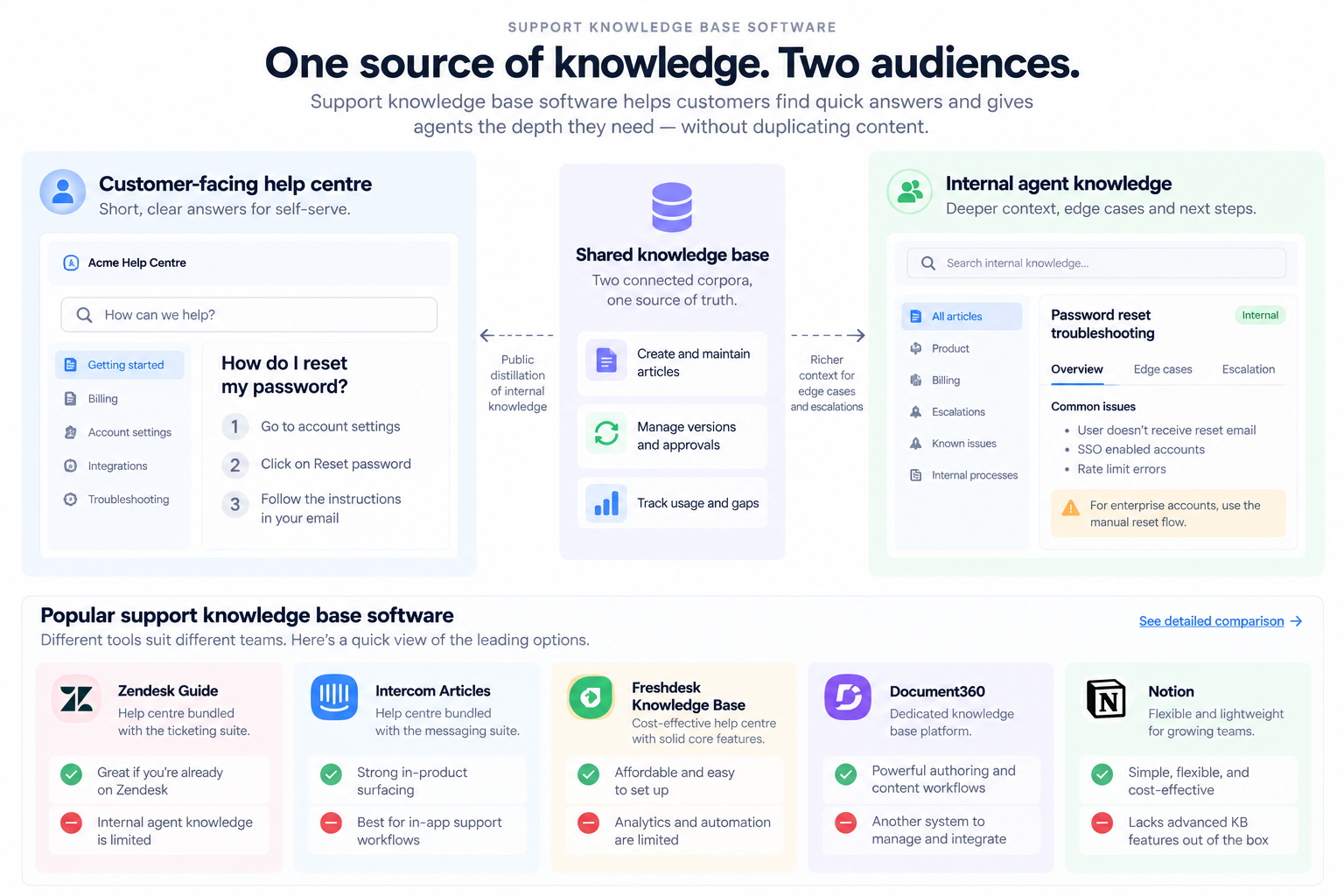
The platforms
Zendesk Guide
Category: Help centre, bundled with the ticketing suite.
The default if you already run Zendesk. Article management, multi-brand help centres, and tight coupling to the ticket workflow so agents can surface and link articles without leaving the conversation.
Best for: Teams already on Zendesk who need a customer-facing help centre with minimal integration work.
Where it loses: It is a help centre first. Internal agent knowledge — the caveats, the escalation paths, the "actually, for enterprise accounts we do X" — sits awkwardly in it, and most teams end up keeping that somewhere else anyway.
Pricing: Bundled into Zendesk suite tiers; published.
Intercom Articles
Category: Help centre, bundled with the messaging suite.
Strong on in-product surfacing — articles appear inside the messenger at the point of confusion, which is where deflection actually happens rather than on a help site nobody visits.
Best for: Product-led companies where support happens in-app and deflection at the moment of friction is the goal.
Where it loses: Same structural limit as Zendesk Guide — built for the customer-facing side. Also the weakest fit if your support runs on email and phone rather than in-product chat.
Pricing: Bundled into Intercom plans; published, and it scales with contact volume rather than seats, which changes the arithmetic at scale.
Freshdesk Knowledge Base
Category: Help centre, bundled with the help desk.
The value case is cost. Solid article management, multilingual support, and a meaningfully lower price point than Zendesk or Intercom for comparable help-centre functionality.
Best for: Cost-sensitive teams who need a competent help centre without the enterprise suite price.
Where it loses: Depth. Analytics, workflow automation around content, and integration breadth are thinner than the category leaders, and that gap widens as the operation grows.
Pricing: Published per-seat tiers, including a free tier.
Document360
Category: Dedicated knowledge base platform.
Purpose-built for knowledge bases rather than bundled with a help desk, which shows in the authoring experience — versioning, workflow states, category management and analytics that treat content as the product rather than an accessory to tickets.
Best for: Teams whose knowledge base is a significant standalone asset — documentation-heavy products, or support operations where content quality is a primary lever.
Where it loses: It is another system to integrate and administer. If your help desk already has a competent knowledge base and your content volume is modest, the incremental value is hard to justify.
Pricing: Published tiers.
Helpjuice
Category: Dedicated knowledge base platform.
Similar positioning to Document360, with a reputation for customisation depth and hands-on setup support. Serves both internal and external corpora reasonably rather than favouring one.
Best for: Teams who want a dedicated platform and value configuration flexibility over out-of-the-box opinionation.
Where it loses: The flexibility is also the cost — more decisions to make, more to maintain, and a heavier lift to get to a good default state.
Pricing: Published, priced by team size rather than strictly per seat.
Guru
Category: Internal knowledge with verification workflow.
Built around the staleness problem. Cards have named owners and verification dates, and the system chases humans to re-confirm. Surfaces into the tools agents already work in rather than requiring a context switch.
Best for: The internal agent-knowledge half of the split — where accuracy matters more than volume and a bounded team can own the content.
Where it loses: Not a customer-facing help centre. And the verification model is only as good as the team's willingness to keep answering the prompts, which decays under load exactly when accuracy matters most.
Pricing: Published per-seat tiers.
Notion
Category: General-purpose authoring, used as a knowledge base.
Frequently the de facto internal knowledge home simply because the rest of the company already works there and agents will actually write in it.
Best for: Smaller support teams already living in Notion, where the alternative is a tool nobody opens.
Where it loses: No support-specific machinery — no verification cycles, no ticket-deflection analytics, no agent-workflow surfacing. It is a good place to write and a poor place to guarantee accuracy at scale.
Pricing: Published per-seat tiers.
Libra
Category: Answer layer across the systems support already uses.
Libra WorkBase does not replace a help centre. It sits on the internal side of the split and answers agent questions over the systems where the truth actually lives — tickets, threads, product docs, past escalations — with sources attached and permissions resolved per user. The Meeting Assistant and Email Assistant capture decisions from calls and threads, which is where most undocumented support knowledge is created and lost.
Best for: Support teams whose internal knowledge problem is that the answers were never written down — they exist in old tickets, in Slack threads, and in the heads of the two people everyone escalates to.
Where it loses: It is not a customer-facing help centre and does not try to be. But it can work as a layer for teams to perform better
Pricing: Published per-seat tiers, sold by team; cloud, VPC or self-hosted.
At a glance
| Platform | Customer-facing | Internal agent | Standalone or bundled | Published pricing |
|---|---|---|---|---|
| Zendesk Guide | Strong | Weak | Bundled | Yes |
| Intercom Articles | Strong | Weak | Bundled | Yes |
| Freshdesk KB | Good | Weak | Bundled | Yes |
| Document360 | Strong | Good | Standalone | Yes |
| Helpjuice | Good | Good | Standalone | Yes |
| Guru | No | Strong | Standalone | Yes |
| Notion | Weak | Moderate | Standalone | Yes |
| Libra | No | Strong | Standalone | Yes |
The failure mode nobody lists as a feature
Support knowledge bases do not usually fail because the software is bad. They fail for a reason that is structural and predictable.
Writing an article takes twenty minutes. Answering the question in Slack takes ninety seconds. Under queue pressure, every rational agent chooses the ninety seconds, every time. The knowledge base decays not through neglect but through a correct individual decision made repeatedly, and no amount of tooling changes that arithmetic directly.
The teams that break the pattern do one of three things. They make capture nearly free — the article is generated from the resolved ticket rather than written from scratch. They make it someone's actual job rather than everyone's spare-time obligation. Or they instrument failed searches and only write the articles the data says people are looking for, which cuts the writing volume enough to make it survivable.
The third is the cheapest to start and the one most teams skip, because it requires admitting that most of the existing corpus was written for questions nobody asked.
What to measure
Four metrics tell you whether the knowledge base is working. Most teams track only the first, which is the least informative.
Article views. Weak signal on its own — a viewed article that did not answer the question looks identical to one that did.
Failed searches. The list of queries that returned nothing useful. This is the most actionable artefact the system produces, and it doubles as your content backlog.
Ticket deflection. Sessions that reached an article and did not open a ticket. Directionally useful, easy to over-claim, and worth treating as a trend rather than an absolute.
Time to first accurate response. For the internal corpus, the only metric that matters. If agents are faster with the knowledge base than without it, it is working. If they are not, they will stop using it regardless of what the view counts say.
Where Libra fits
Libra WorkBase covers the internal half. It indexes the systems a support team already works across and answers questions over them with sources attached, so an agent mid-ticket gets the caveat and the escalation path without opening four tabs or asking in a channel. Capture happens as a side effect of work — decisions made in a meeting or an email thread land in the knowledge layer without anyone writing a document.
Paired with a help centre for the customer-facing side, that covers both halves of the split without forcing one corpus to serve two audiences. See Libra WorkBase for Customer Support for how that works in practice.