What Is an AI Workspace? The Category, Explained
An AI workspace gives AI persistent access to company context, tools, and workflows. Learn what defines the category and how to evaluate one.
8 min readby Prithvi

An AI workspace is an environment where AI has persistent access to a company's work — its documents, conversations, records, and tools — rather than starting from nothing in each new chat.
The defining property is continuity of context, not the model.
The term gets applied to three quite different things, and the differences matter more than the shared label.
The three things called an AI workspace
A model playground
A place to test prompts against different models, with versioning and API keys.
Built for developers.
Google AI Studio and similar tools sit here, and they are one reason this search term is noisy — many people typing "AI workspace" want exactly this and nothing else.
That is a legitimate use of the term, but it is fundamentally different from an AI workspace designed around an organisation's ongoing work.
An AI layer inside an existing tool
Notion AI, Slack AI, Confluence with Rovo.
The workspace is the product you already had; AI is a feature inside it.
Context is whatever that product holds — excellent within its walls, blind outside them.
A company-context workspace
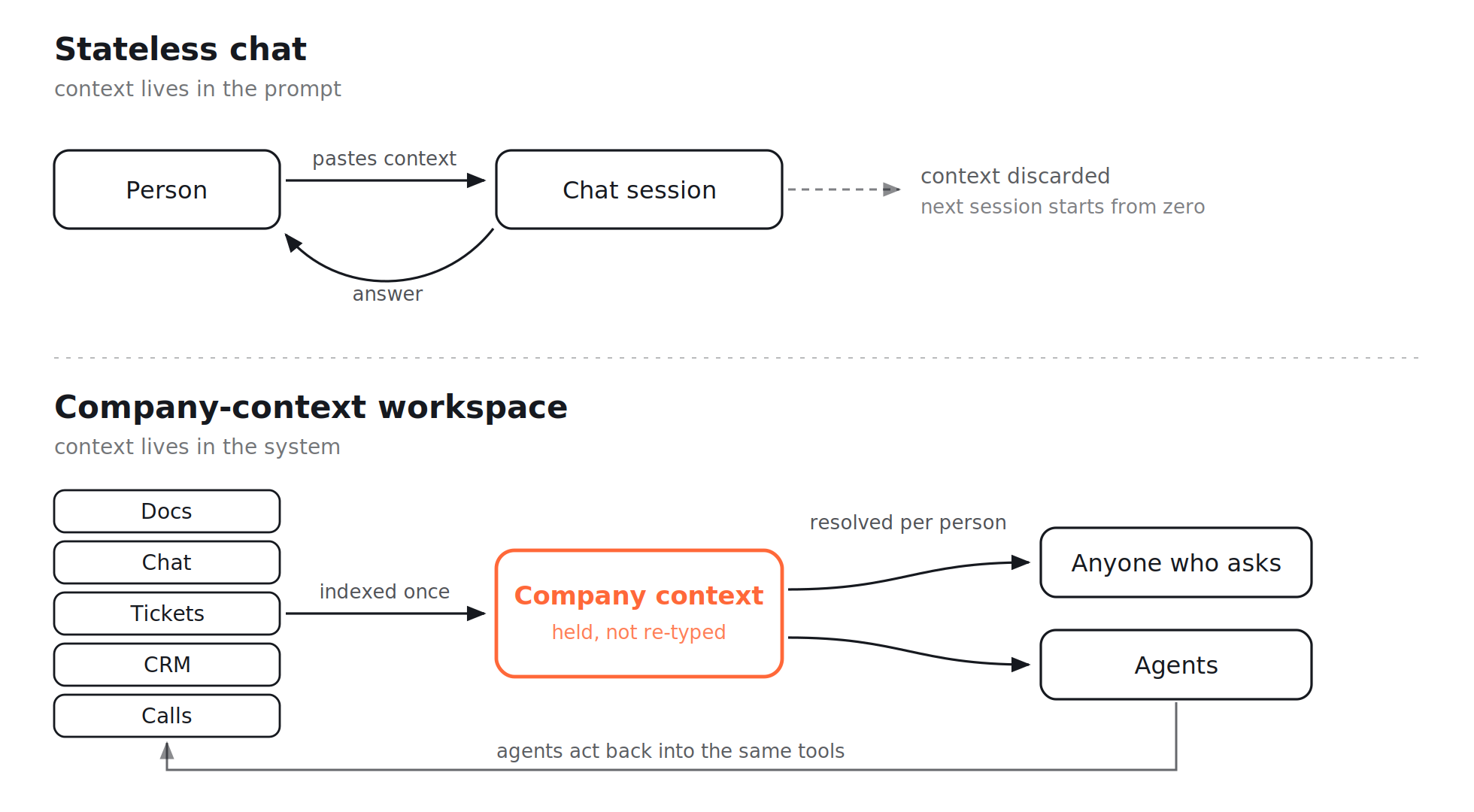
A layer that connects across the tools a company uses, holds the resulting context persistently, and lets both people and agents work from it.
This is the sense in which the term describes a category rather than a feature, and it is the one worth defining carefully.
A company-context workspace is not simply a chat window connected to a few documents. It is an environment where company information, permissions, and workflows become part of the AI's working context.
What makes it a workspace rather than a chatbot?
Four properties.
A product missing any of them is closer to a chat interface with a good marketing page.
Persistent context
The system knows what your company knows across sessions.
You should not have to re-explain who the customer is, what the project does, or which of two conflicting documents is current each time.
The context should persist because the work persists.
This is one of the fundamental differences between a company-context workspace and a general-purpose AI assistant. A general chatbot can be extremely capable, but the user is still responsible for supplying much of the context.
Cross-tool reach
Context is assembled from where work actually happens:
- Documents
- Chat
- Tickets
- CRM
- Meetings
- Project management tools
- Business systems
A workspace that only sees one tool is that tool's AI feature, which is a fine thing to be and a different thing to buy.
The value of a company-context layer comes from connecting information that is naturally fragmented across systems.
Libra's Knowledge Base, for example, connects documents, conversations, and other company information into a searchable layer while keeping the permissions around that information intact.
Permission awareness
Each person sees answers built only from what they can already access, resolved at the moment they ask.
This is not a nice-to-have.
Without permission awareness, you cannot safely deploy a company-wide workspace.
The system needs to understand that two employees asking exactly the same question may legitimately receive different answers because they have access to different information.
The ability to act
Producing an answer is where a chatbot stops.
A workspace can carry the next step:
- Draft the reply
- Update the record
- Prepare the brief
- Create the ticket
- Route the follow-up
- Research the question
- Run a defined workflow
This is where an AI workspace starts to overlap with AI agents.
Libra's AI Agents can work from the same company context and carry out multi-step tasks while preserving approval controls around actions.
Why the category appeared
The first wave of workplace AI was per-person and stateless.
Everyone got a chat window, and every conversation started from zero.
That produced real individual productivity and almost no organisational change, because the context lived in each person's head and had to be retyped every time.
The constraint was never simply model quality.
It was that the model did not know anything about the company it was working for.
An AI workspace is the response to that:
Put the context in the system rather than in the prompt.
The second-order effect is what makes it a category rather than a feature.
Once the context is shared, the output stops being purely personal.
An answer assembled from the company's actual record can be consistent for everyone who has permission to access that information — which is what a knowledge system is supposed to do and what per-person chat could never deliver on its own.
This is also why the distinction between an AI workspace and an enterprise knowledge base is becoming less rigid.
The knowledge layer provides the context.
The workspace provides the environment in which people and AI can use that context.
How to evaluate an AI workspace
Five questions, ordered so the answers that disqualify come first.
1. Where does its context come from?
List the sources it connects to and compare them against your real stack.
A workspace with three connectors is a demo if your company's work happens across twenty systems.
Look beyond the number of integrations.
Ask whether the system can actually retrieve the relevant context from each source, preserve permissions, and keep information current.
2. How are permissions handled?
At query time against the source, or from a mirrored copy?
And how quickly does a revocation take effect?
Get a number.
If someone loses access to a document at 10 AM, you need to know when that document stops appearing in their AI results.
"Enterprise-grade permissions" is not an answer.
3. What persists between sessions?
Ask specifically.
"Memory" can mean anything from a stored preference to a maintained model of your organisation, and vendors use the word for both.
You want to know:
- What information persists?
- Where is it stored?
- Who can access it?
- How is it updated?
- How is stale information handled?
- Can users inspect the sources behind an answer?
4. Can it act, or only answer?
And if it acts, what requires approval?
A workspace that can send an email without a checkpoint is a different risk profile from one that drafts an email for approval.
Look for explicit controls around:
- What the AI can access
- What it can change
- Which actions require approval
- What gets logged
- Who is accountable for the action
Libra's AI Agents use approval workflows so agents can handle defined work while stopping before actions that require human approval.
5. Where does it run?
Cloud, VPC, or self-hosted.
If you have data residency or security constraints, this is a first-round qualifier, not a procurement detail.
Libra's enterprise offering supports deployment in your own environment, including self-hosted deployments, alongside Libra Cloud. Libra for Enterprise is designed around bringing company context and governed AI execution together while keeping enterprise control over the environment.
Where an AI workspace does not help
Worth saying, because the category is being oversold.
It cannot retrieve what never existed
If your knowledge genuinely is not written anywhere, a workspace cannot retrieve it.
It can reach material in channels nobody searches, which is more than most people expect — but it cannot reach what was only ever said out loud.
This is one reason meeting context matters.
Libra Meeting Assistant captures decisions, actions, owners, and relevant context during meetings rather than treating the transcript as the end product.
The goal is not to pretend AI can magically extract knowledge from people's heads.
It is to make more of the company's existing record usable.
It inherits your permission mess
If your permissions are inconsistent, a workspace queries that inconsistency faster.
Several organisations discover the true state of their access control the week this goes live.
AI does not eliminate the need for good access control.
It makes the consequences of bad access control much more visible.
It is unnecessary for deterministic work
If the work is genuinely deterministic, you want workflow automation, not a workspace.
Cheaper, faster, auditable, and it fails loudly.
The value of an AI workspace comes from situations where the system needs to understand context, make decisions, retrieve information, or determine the next step.
AI workspace vs AI assistant vs AI agent
These terms overlap, but they describe different layers.
An AI assistant generally helps a person complete individual tasks.
An AI agent is given a goal and can reason through multiple steps, use tools, and take actions within defined boundaries.
An AI workspace is the environment that gives people and agents persistent access to the context they need to do that work.
You can think of the relationship like this:
AI assistant → helps you work
AI agent → does work for you
AI workspace → gives both access to the context and tools they need
The categories will continue to overlap as products become more capable.
What matters is not the label.
It is what the system actually knows, what it can access, and what it can do.
Where Libra fits
Libra WorkBase sits in the company-context version of the AI workspace category.
It connects the tools your team already uses, brings that information into a persistent company context, and lets both people and AI agents work from it.
The important part is that the context is not limited to one application.
A customer conversation might be in Gmail.
The account record might be in Salesforce.
A product decision might be in Slack.
The implementation might be in Jira.
A meeting might contain the missing piece of context.
A company-context workspace connects those pieces so the AI does not have to start from an empty chat window every time.
Libra's Knowledge Base provides the knowledge layer, while AI Agents can use that context to carry out defined work.
The result is closer to an operating environment for AI than another chatbot.
That distinction matters because the long-term value of an AI workspace is not how impressive its chat interface looks.
It is how much useful context it can maintain, how safely it can use that context, and how much work it can move forward.
Final thoughts
The phrase "AI workspace" is still being used to describe several different products.
A developer playground is not the same thing as an AI feature inside a productivity tool.
And neither is the same thing as a company-context workspace designed to give people and AI persistent access to the organisation's work.
The defining question is therefore not: "Which AI model does it use?"
It is: "What does it know, what can it access, and what can it do with that context?"
That is the distinction between another chatbot and an AI workspace that can actually become part of how a company works.