Customer Service Knowledge Base: What to Build and What to Skip
Learn how to build a customer service knowledge base that answers real customer questions, stays accurate, and reduces support tickets through better content and maintenance.
6 min readby Prithvi

A customer service knowledge base is the set of articles that let a customer answer their own question, and let an agent answer it consistently when the customer does not. It is one of the few support investments where the returns are measurable and the failure modes are well understood — which makes it frustrating that most of them decay within a year.
This article covers what to put in one, the order to build it in, and the specific reasons they go stale. For the tooling comparison, see support knowledge base software.
What belongs in it
Not everything a support team knows belongs in a customer-facing knowledge base. The filter is simple: would you be comfortable if a competitor, a journalist, or a frustrated customer on social media quoted this article verbatim? If not, it belongs in the internal knowledge base instead.
What earns a place:
How-to articles. The mechanical steps to accomplish something in your product. Highest volume, highest deflection, lowest maintenance burden per article — though they break immediately when the interface changes.
Troubleshooting. Symptom-first, not cause-first. Customers search for what they are seeing ("export keeps failing"), not for what is wrong ("SFTP timeout"). Articles titled by cause are written for the support team and found by nobody.
Policies. Refunds, cancellations, data handling, SLAs. Low volume, disproportionately high value, because these are the questions where an inconsistent answer creates a real problem.
Definitions and concepts. What your terms mean. Worth writing because they are stable and because they reduce the confusion that generates tickets in the first place.
Known issues. The article that says "yes, this is broken, here is the workaround, here is where to watch for the fix." Uncomfortable to publish and one of the most effective deflection tools available, because the alternative is the same ticket arriving two hundred times.
What does not belong: internal escalation paths, pricing exceptions, account-specific arrangements, anything about individual customers, and the caveats your agents need but your customers would misread.
Build it in the order the data says
The instinct is to map the product and write an article per feature. That produces a large corpus in which most articles are never read, and it exhausts the team before the useful articles exist.
Work from demand instead.
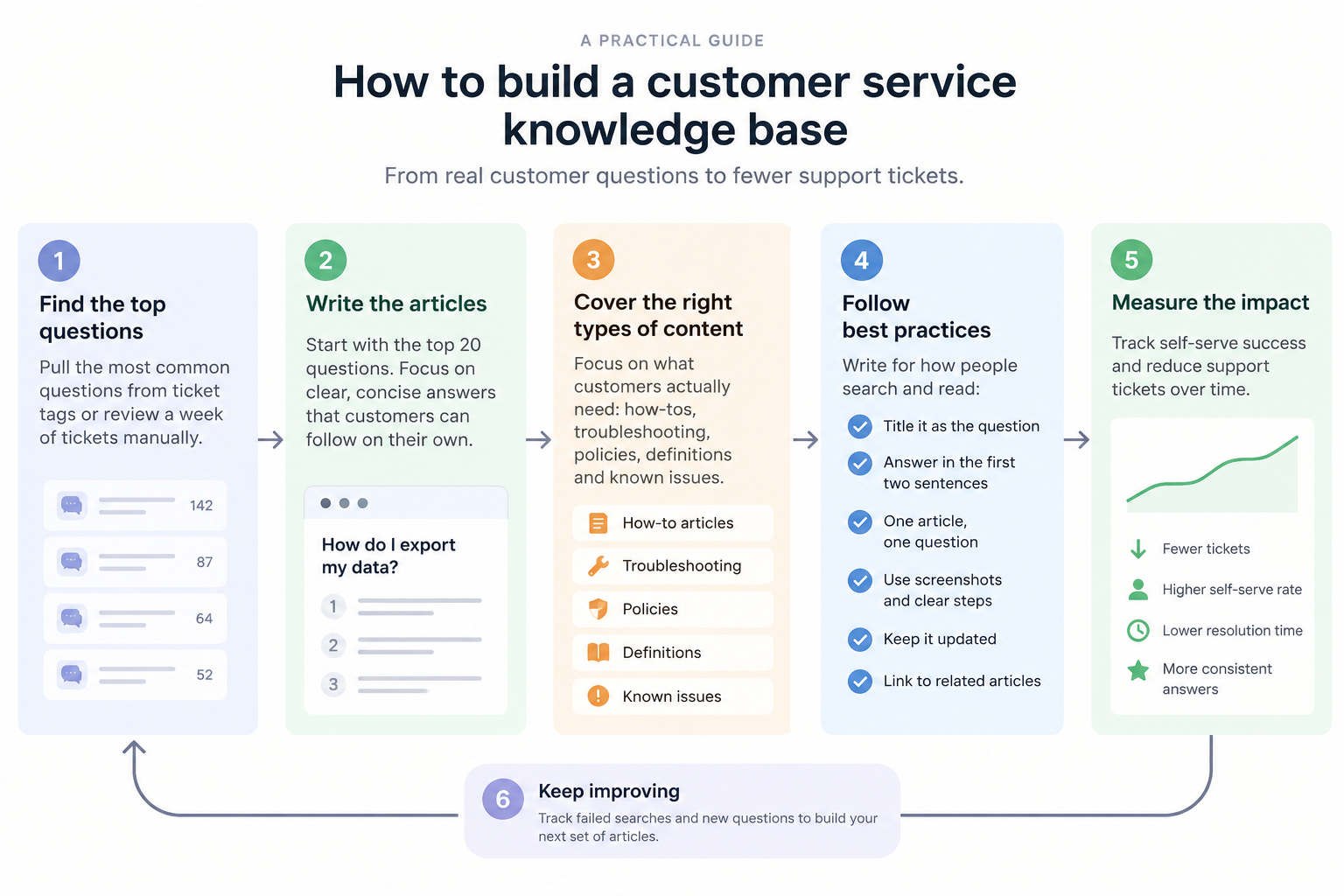
Step one: get the top twenty questions. Pull them from ticket tags if your tagging is honest, or tally a week of tickets manually if it is not. Manual tallying for one week is more accurate than six months of neglected tags and takes an afternoon.
Step two: write those twenty. Nothing else. Resist the completeness instinct — a corpus of twenty accurate, well-written articles covering real demand outperforms two hundred covering the product map.
Step three: instrument failed searches. Capture every query that returned nothing useful. This list becomes your permanent content backlog and it is far better than any internal guess about what customers need.
Step four: write from the backlog, not from ambition. Each new article should answer a question the data shows people are actually asking.
This sequence also solves the political problem. "We should document everything" is an unfundable project. "These twelve queries failed 400 times last month" is a specific, defensible request for someone's time.
What makes an article work
The structural conventions matter more here than in most writing, because people do not read knowledge base articles — they scan them while mildly annoyed.
Title it as the question. "How do I export my data?" is findable. "Data export functionality" is not. Match how people search, not how your product team names things.
Answer in the first two sentences. If the answer is "Settings, then Export, then choose CSV," say that immediately. Context, caveats and related information come after. An article that opens with three paragraphs of preamble has already lost most of its readers.
One article, one question. The temptation to cover adjacent questions in the same article makes every individual answer harder to find. Split them and cross-link.
Show the interface as it is now. Screenshots date fast and a wrong screenshot is worse than none, because it makes the customer doubt they are in the right place. Either commit to updating them or describe the path in text.
State what the article does not cover. A line saying "this covers the standard export; for scheduled exports see [other article]" prevents the follow-up ticket.
Name the failure case. The most-skipped and most valuable section. "If the export is empty, it usually means the date filter excludes all records" deflects a specific ticket that would otherwise arrive.
Why they go stale
Knowledge bases do not decay through neglect exactly. They decay through a rational individual decision, repeated.
Writing an article takes twenty minutes. Answering the question directly takes ninety seconds. Under queue pressure, the ninety seconds wins every time, and it should — the customer in front of you is real and the future customer is hypothetical. No amount of reminding people that documentation matters changes that arithmetic.
Four specific mechanisms:
No owner per article. A knowledge base owned by "the support team" is owned by nobody. Individual articles need named individuals accountable for accuracy.
No review trigger. Calendar-based review ("everything gets checked quarterly") generates work disconnected from reality. Release-based review — when this feature ships, these four articles are checked — is smaller and actually happens.
No feedback loop. If agents cannot flag a wrong article in under ten seconds, from where they are working, they will not flag it. They will work around it and the error persists for months.
Writing competes with delivery. The only durable fixes are making capture nearly free, or making it someone's actual job. Everything else is an appeal to virtue that loses to the queue.
Measuring whether it works
Four numbers. Most teams track the first and it is the least useful.
| Metric | What it tells you | Watch out for |
|---|---|---|
| Article views | Very little on its own | A viewed article that failed looks like one that worked |
| Failed searches | Your content backlog | Requires instrumentation most teams skip |
| Ticket deflection | Whether self-serve is working | Easy to over-claim; treat as a trend |
| Contact rate per release | Whether documentation keeps pace | The honest leading indicator |
That last one is underused. If ticket volume spikes after every release, the documentation is not keeping up with the product, and no amount of restructuring the help centre will fix a cadence problem.
The internal half
A customer service knowledge base only covers what customers should see. Agents need more — the escalation path, the exception for enterprise accounts, the fact that the documented workaround stopped working last Tuesday.
That content cannot go in the public knowledge base, and putting it in a second static system recreates the same staleness problem one layer down. The internal side is usually better served by a layer that answers over the systems where the truth already lives — resolved tickets, engineering threads, release notes — rather than another corpus someone has to write and maintain.
Both halves are needed. The mistake is trying to serve both from one corpus, which produces public articles cluttered with internal caveats or internal content sanitised until it is useless.
Where Libra fits
Libra WorkBase covers the internal half. It answers agent questions over the systems a support team already works in, with sources attached and permissions resolved per user, so the caveat and the escalation path surface mid-ticket without a search across four tools. Capture happens as a by-product of work — decisions made in a meeting or an email thread enter the knowledge layer without anyone writing them up.
That leaves the customer-facing knowledge base to do the job it is good at: a small, accurate, well-maintained set of public articles covering real demand. See Libra WorkBase for Customer Support.