AI Agents for Business: Where They Work and Where They Don’t
Learn how AI agents for business work, which processes they can automate, where human approval matters, and how to deploy agents safely.
12 min readby Prithvi

AI Agents for Business: Where They Work and Where They Don't
An AI agent for business is a system given a work outcome rather than a set of instructions: it gathers the context it needs from company systems, plans a sequence of actions, carries them out through connected tools, and checks the result. The question worth answering is not what they can do — it is which parts of a process should run unattended and which should stop for a person.
What an AI agent actually is
An AI agent is a language model wrapped in a loop, connected to tools, and pointed at a goal. The model supplies judgement about what to do next. The loop supplies persistence. The tools supply the ability to change something outside the chat window.
Every credible agent architecture runs some version of a five-stage loop.
- Context. It retrieves what it needs — the CRM record, the last three email threads, the policy document, the ticket queue. Retrieval quality sets the ceiling on everything after it.
- Plan. It decomposes the outcome into steps, usually implicitly, sometimes as a written plan it can revise.
- Act. It calls a tool: a search, an API write, a database query. This step distinguishes an agent from a chatbot.
- Observe. It reads the tool's response — including errors, empty results and partial data — as new evidence.
- Adapt. It revises the plan and loops, terminating on success, on a step budget, or on a guardrail.
The consequential property is that the agent chooses its own path. Nobody specified that it would query billing before the CRM. That flexibility is the value proposition and the risk profile at once. A deeper walkthrough of the loop is in this breakdown of how autonomous AI agents work.
Two properties decide whether an agent is safe to deploy: reversibility of its actions, and the existence of a verification path that separates correct output from confident nonsense.
Agent vs assistant vs copilot vs workflow automation
| Type | Who decides the steps | Acts on systems | When errors surface | Best for |
|---|---|---|---|---|
| Assistant | You, per message | Rarely — usually read-only | Immediately, in the reply | Drafting, summarising, answering |
| Copilot | You, with suggestions in the flow of work | Only what you accept | When you accept or reject | Writing, coding, spreadsheet work |
| Agent | The agent, against a goal | Yes, across multiple tools | Later, after several dependent steps | Multi-step preparation and reconciliation |
| Workflow automation | A person, once, at design time | Yes, deterministically | At the failing step, loudly | Stable, rule-shaped, high-volume tasks |
The practical consequence sits in the fourth column. An assistant's mistakes are visible immediately in its reply — you read the paragraph, you see the wrong figure, you fix it. An agent's mistakes happen mid-sequence and are discovered later, by which point it may have taken three more actions on a wrong premise.
The autonomy boundary
Every process has a point where reversible preparation ends and irreversible commitment begins. Drafting a refund note is reversible. Issuing the refund is not. Assembling a pipeline review is reversible. Emailing it to the board is not. The question is not how autonomous the agent should be in general — it is where that point falls in this specific process.
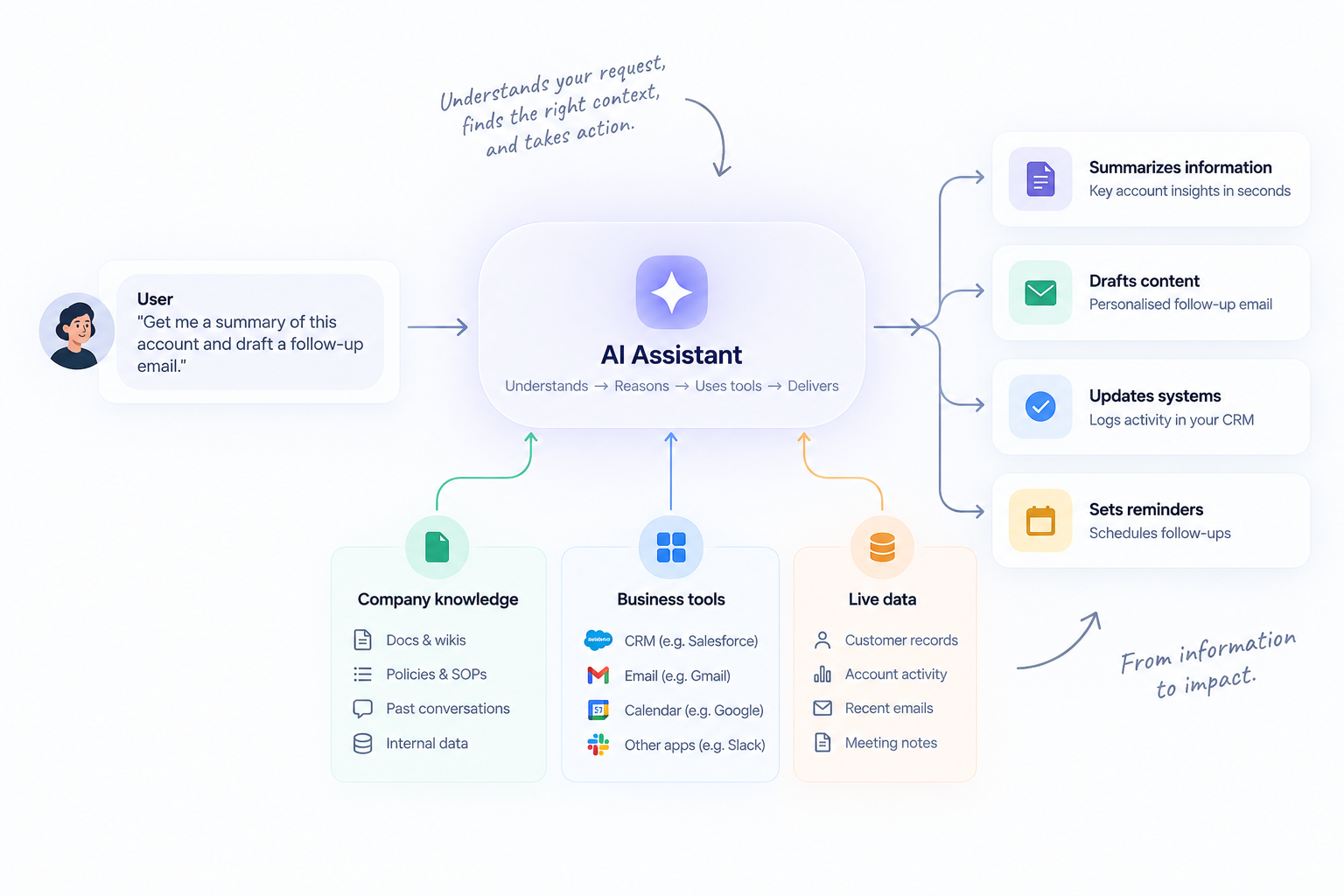
The same boundary recurs across every function: gathering context and preparing work is safe to run unattended, and the step that is irreversible or externally visible is not. Deployments that fail usually put the boundary in the wrong place rather than choosing the wrong model.
Where agents work today, by function
The pattern across every function below is the same. Agents perform well where the work is preparation — assembling context, reconciling sources, producing a draft a person judges in seconds rather than assembling in an hour. They fail where the work is the final commitment.
Sales
A pre-call brief is the clearest win. Given a calendar event, the agent pulls the account record, reads six months of email with that domain, checks the support queue, scans product analytics for usage change, and finds recent internal threads. It produces one page: open commitments, unresolved complaints, usage trend, who on the buying side has gone quiet.
It stops before sending anything. The rep reads the brief in ninety seconds instead of assembling it in forty minutes. Post-call, it drafts CRM updates and a follow-up email, both queued for approval. Stage changes stay manual, because pipeline data feeds forecasts that feed decisions. More on the pattern is in this piece on AI agents for sales.
Customer support
Ticket triage and draft resolution work well. The agent reads the ticket, identifies the customer's plan and entitlement, searches the knowledge base and resolved tickets for the closest matches, checks whether a known incident is open, and drafts a reply with the relevant article linked.
Where it stops depends on risk. Password reset instructions can go out unattended. Anything that issues credit, changes a contract or commits to a delivery date stops for a person. The measurable gain is first-response time and the share of tickets closed with one approval click.
Finance
Reconciliation is preparation work by nature. An agent matching invoices to purchase orders pulls both records, compares line items, flags quantity and price variances, checks the vendor's contract terms, and produces an exceptions list with a recommended disposition. On a 900-invoice month, a two-day task becomes a review of forty exceptions.
It does not post the journal entry or release payment. The boundary is unusually clean in finance because the controls already exist — the agent slots in beneath an approval step that was already there.
People ops
Onboarding coordination and policy answering both suit agents. For a new starter, the agent assembles the access list from the role template, raises provisioning tickets, drafts the thirty-day plan and schedules standing meetings. For policy questions it answers from the handbook with a citation, and escalates anything touching pay, performance or grievance.
The hard constraint is permissions. An agent answering HR questions must enforce the asker's access rights, not its own. If it can read the compensation sheet, a carefully phrased question will reach it. That is a permissions problem, not a prompting one.
Engineering
Triage and investigation are strong. On a failing build, an agent reads the CI log, identifies the failing test, finds commits touching that path since the last green run, checks whether the test flaked recently, and posts a summary naming a likely cause and the owning team.
Code changes are different.
Agents can open a pull request for a small, well-tested change — dependency bumps, lint fixes, mechanical refactors — because the test suite is a real verification path. They should not merge. Similar preparation-shaped wins exist across marketing operations, where campaign briefs and performance reconciliation take the same shape.
Where agents don't work
Irreversible actions without review
Sending an external email, issuing a refund, deleting records, publishing content, terminating access, moving money. These share one property: no undo is free. A wrong email to 4,000 customers is not repaired by a correction — it is repaired by a week of support load and a credibility cost nobody logs. Agents can prepare each of these to the point of one click. They should not take the click until you have months of data on how often the prepared version was accepted unchanged.
Work with no verification path
If neither the agent nor a reviewer can cheaply tell a right answer from a wrong one, the agent is generating confidence, not work.
Legal interpretation of a non-standard clause, market sizing with no reliable data, forecasting a new product line, the output looks identical whether it is sound or fabricated. Code has tests. Reconciliation has a ledger. Strategic judgement has neither, and an agent's fluency there is dangerous because it reduces the scrutiny the output receives.
Processes where the deciding context is not accessible
This is the most common cause of a disappointing pilot. The agent reads the CRM, the email and the docs and the real reason the deal stalled was said on a call and never written down. The decisive context sits in a WhatsApp thread, a spreadsheet on someone's desktop, or the head of the person who has run the account for six years.
The agent reasons well over the portion that is written, cannot know the rest exists, and so does not hedge. Before deploying, ask where the deciding information actually lives.
Genuinely rule-shaped work
If the process is a decision tree with stable inputs, a workflow engine does it faster, cheaper and with an exact audit trail. Auto-approving an expense under £50, assigning tickets by product area, sending a renewal reminder at day 60, none of these need reasoning.
An agent adds cost per run, latency and non-determinism to a problem that had none. The test: if you can write the rules down completely in an afternoon, write the rules down.
Work where the cost of being confidently wrong exceeds the time saved
Run the arithmetic honestly. An agent saving fifteen minutes on a task done 200 times a month saves 50 hours. If it is wrong 2% of the time, and each wrong output triggers a customer escalation or a compliance review, those four bad outputs can exceed 50 hours of cost.
This calculation kills more use cases than any technical limit, and it is why regulated communications stay under review indefinitely whatever the measured accuracy.
The autonomy ladder
| Level | What it means | What it suits |
|---|---|---|
| 1. Propose | Agent suggests an action and its reasoning; a person does the work | New processes, high-stakes decisions, the first month of any pilot |
| 2. Prepare | Agent assembles context and produces a complete draft; a person reviews and commits | Most production value today — briefs, drafts, reconciliations, triage |
| 3. Execute within boundaries | Agent acts unattended inside explicit limits: named systems, value caps, allowed record types | Reversible internal actions — tagging, routing, ticket creation, internal updates |
| 4. Fully autonomous | Agent completes the outcome end to end, monitored after the fact | High-volume, low-consequence, well-verified tasks only |
Move up one rung at a time, per action type, not per agent. An agent may sit at level 3 for internal tickets and level 1 for anything touching a customer record. Autonomy is a property of actions, not systems.
The promotion criterion should be numeric and agreed beforehand. A workable rule: an action type moves from Prepare to Execute after 200 consecutive instances accepted without edits.
Below 95% acceptance, it stays. Moving down should be as routine as moving up. Structuring these thresholds formally is covered in this framework for AI agent governance.
What to evaluate before deploying
| Question | What a real answer sounds like |
|---|---|
| Which systems can it read? | A named list with connector depth — "Salesforce custom fields, Gmail attachments, Confluence page restrictions" — not "100+ integrations" |
| Which systems can it write to, and at what granularity? | Specific write scopes per system, configurable per agent, with a dry-run mode |
| Whose permissions apply at query time? | The requesting user's, enforced live against the source system on every retrieval, not at index time |
| How is the autonomy boundary configured? | Per action type, in a UI a non-engineer can change, with approval routing by value or record type |
| What is in the audit log, and for how long? | Every tool call with inputs, outputs, retrieved context and approving user, retained for a period you set, exportable |
| Where does data live and process? | A named region, plus the deployment options: multi-tenant cloud, single-tenant VPC, or fully self-hosted |
| What happens when it cannot complete a task? | It stops, records why and routes to a person — not a plausible answer built from partial data |
| What happens when a connected tool fails or rate-limits? | Retries with backoff, then halts and surfaces the failure; no silent continuation on stale data |
Ask for a demo on your own data, on your messiest process, vendors demo on clean fixtures, and the gap tells you most of what you need. These eight questions separate genuine enterprise AI agent platforms from wrappers.
How to run a pilot that survives contact with production
Pick one process with a countable baseline. Not "improve support" — "draft first replies for tier-1 billing tickets, 340 a month, median first response 4.2 hours." Measure it for two weeks before the agent exists.
Map the boundary before you build. List every action and mark it reversible or irreversible. The irreversible ones are your approval gates. An afternoon here prevents most later arguments.
Connect the minimum systems, then test permissions. Take a restricted user and try to extract something they should not see. Do this before the pilot — permission cleanup is usually the longest task in the project.
Run at Prepare for four weeks with five users. Everything drafts, nothing sends. Five engaged reviewers give better signal than fifty passive ones.
Measure the review, not the output. Track acceptance rate, edit distance and time-to-approve. If people rewrite drafts from scratch, the context is wrong, not the model — the agent is missing a system, a document or a permission, and changing the prompt will not fix it.
Promote one action type, keep the rest gated. Choose the action with the highest unedited acceptance rate and the smallest blast radius. Instrument it, watch it a month, then consider the next.
Two failure signals deserve monitoring. Reviewers approving in under three seconds are rubber-stamping, which makes your accuracy number fiction. A rising share of runs ending on step budget means the agent is looping, usually a retrieval problem, not a reasoning one.
What it costs
Published pricing in this category is uneven. Microsoft 365 Copilot is $18 per user per month on an annual commitment. Onyx is open source, with a hosted tier at $20 per user per month. Dust publishes a free tier, then €24 and €120 per seat per month, with single-tenant deployment available only on Enterprise. Glean and Kore.ai publish no pricing at all, which means a sales cycle before you can build a business case.
Per-seat pricing suits assistant-shaped usage, where value scales with how many people ask questions. It fits agents less well: one run touching six systems costs the same whether one person or thirty benefit. Ask whether agent workload is metered separately from seats, and what the bill looks like at 10,000 runs a month.
The costs that surprise people are not on the pricing page. Connector work is the largest: a documented SaaS API is a day, an on-premise system with a bespoke schema is weeks. Permission cleanup is second — shared drives and wikis accumulate years of over-broad access, and an agent that faithfully enforces existing permissions will surface things it should not. That cleanup is real work with no AI in it. Review time is third, and it is a genuine net cost for the first six to eight weeks.
Libra WorkBase puts the agent layer on top of a shared knowledge base, meeting and email assistants, and business intelligence, so agents read the same permissioned context your team does — deployable in cloud, VPC or fully self-hosted, and priced by team rather than per seat.