AI Agents for Customer Support: How They Work, What to Automate, and How to Choose
Learn how AI agents for customer support work, what to automate first, how to choose a platform, and how to manage implementation, security, and performance.
10 min readby Prithvi

Support automation has a credibility problem, and it was earned. A decade of deflection bots trained customers to type "agent" before reading a single word of the response.
AI agents are architecturally different, in one specific way: a chatbot matches a question to an article, while an AI agent can look up the customer's actual account, work out what happened, and take the action that fixes it. The first deflects. The second resolves.
Whether that distinction survives contact with your stack depends almost entirely on decisions made before anything ships. This guide covers how they work, where the value is, how the platforms compare, how to sequence a rollout, what governance is required, and how to measure it honestly.
What an AI support agent is and how it works
An AI support agent is software that pursues a resolution rather than producing a response. Four components make that possible.
1. Retrieval across more than the help centre
Most answers aren't in published articles. They're in resolved tickets, internal runbooks, engineering docs and release notes. An agent grounded only on the help centre hits a quality ceiling almost immediately — it can restate documentation, which customers have usually already read.
This requires semantic search over a genuine knowledge base, with RAG so answers cite their sources. The tribal knowledge problem is acute in support, where the best answers live in senior agents' heads and in tickets nobody indexed.
2. Account context
The agent needs this specific customer's plan, entitlements, usage, open issues and contact history — through connectors into support, billing and product systems. Without it, every answer is generic.
3. Action, with permission
Issuing a credit, resetting a configuration, escalating a severity — each is a write to a real system. Each needs governed execution and an approval workflow scoped per action class. Reading account state can be autonomous. Issuing a refund should not be.
4. The reasoning loop
Act, observe, assess, adjust. This is what makes it an agent rather than a decision tree, and it is also where the risk concentrates: a scripted bot fails predictably, an agent fails creatively.
Agent versus chatbot
| Support chatbot | AI support agent | |
|---|---|---|
| Input | Question text | Question plus account state, history, entitlements |
| Knowledge | Help-centre articles | Help centre, tickets, internal docs, systems |
| Action | Links to an article | Reads systems; writes with approval |
| Multi-turn | Scripted branches | Re-plans based on what it finds |
| Failure mode | Wrong article | Wrong action |
| Measured by | Deflection rate | Resolution rate and reopen rate |
That bottom row changes organisational behaviour more than any feature. Deflection rate rewards not reaching a human. Resolution rate rewards fixing the problem. Teams that keep deflection as the primary metric gradually rebuild the bot they were trying to replace.
Benefits
In rough order of how reliably they materialise.
Resolution of high-volume, low-judgement contacts. Status checks, "where is my order", password and access basics, plan and entitlement questions. These dominate most queues, are verifiable against systems, and carry low cost of error.
Coverage outside business hours. The clearest unambiguous gain. A resolution at 2am is worth more than the same resolution at 9am, and it removes the overnight backlog that distorts morning staffing.
Faster first meaningful response. Not the first reply, an autoresponder does that. The gap between contact and substantive progress is what customers actually experience as speed.
Consistency. The same procedure applied at the end of a shift as at the start. For triage, classification and routing, variance is often the real problem and consistency is worth more than throughput.
Senior agent leverage. The strongest second-order effect. When an agent surfaces how your best people resolved similar tickets, the expertise that was locked in individuals becomes available to the whole team. This improves human performance, not just automation rate.
Deeper investigation per ticket. Agents can check five systems in the time a human checks one. Even where the human still decides, the decision is better informed.
Capacity reallocation. Teams that redeploy recovered time into proactive outreach, documentation and backlog work get compounding returns. Teams that plan purely for headcount reduction tend to find the remaining work was the hard part. See Human–AI Coworker Workflows.
Treat published industry percentages with suspicion. Results vary enormously by ticket mix, and vendor figures are rarely measured the way your operations team would measure them. Baseline your own queue first.
Use cases and applications
Customer-facing
- Status and tracking — order, shipment, ticket, request state. Read-only and verifiable.
- Documentation and how-to — grounded in your docs, with citations.
- Account and entitlement questions — plan limits, seat counts, feature availability, renewal dates.
- Basic troubleshooting — guided diagnosis against actual configuration rather than a generic flowchart.
- Data and preference updates — scoped, reversible, logged.
- Proactive outreach — flagging an issue before the customer notices it.
Internal
- Triage and routing — classify, prioritise, assign. No customer-facing output at all, which makes it the lowest-risk high-value deployment available.
- Draft-for-agent — the AI writes, a human reviews and sends. Underrated: it delivers most of the efficiency with almost none of the risk, and the edits your team makes are the clearest signal of where the agent is weak.
- Ticket summarisation for handoff — especially across shifts and timezones.
- Bug reproduction and categorisation — see Engineering & Product.
- Knowledge gap detection — identifying what customers ask that your documentation doesn't answer. See Customer Service Knowledge Base: What to Build and What to Skip.
- QA sampling — reviewing conversations against quality criteria at a coverage level humans can't match.
Where to be careful, or not go at all
- Refunds, credits and billing adjustments without an approval gate.
- Cancellation and retention conversations.
- Security, account recovery and access requests — where social engineering is the attack, an agent is the vulnerability.
- Regulated advice of any kind.
- Anything irreversible.
How to choose an AI agent solution
Knowledge and context
- Can it ground on resolved tickets and internal docs, or only published articles?
- Does it cite sources, so a human can verify in seconds?
- Can it read live account state, or only conversation text?
- How does it handle a question it can't answer — escalate, or improvise?
Actions and permissions
- Can it write to systems, and is permission scoped per action class?
- Does it act as the user or as a service account? Service-account access bypasses your permission model. See permissions-aware AI.
- Can approval requirements be configured per action rather than globally?
- Is every tool call logged with parameters and results? See audit trail.
Escalation
- Does the human receive full context — what was attempted and why it stopped — or a transcript dump?
- Can a human take over mid-conversation without the customer repeating themselves?
- Are confidence thresholds configurable, and what happens below them?
Operations and commercials
- How is quality evaluated over time, and is it scheduled? See evaluation.
- What's the deployment model — cloud, VPC, self-hosted?
- Is pricing per resolution, per seat, or per team? Per-resolution pricing aligns vendor incentives with volume, not with deflecting work you'd rather never receive.
- What's the retention and training-data position, contractually? See zero data retention.
Time to value
- What's required before the first useful response — connector setup, content migration, intent training?
Human and AI collaboration
The handoff is where most implementations lose customers, and it gets the least design attention.
Escalation must carry context. The human needs the customer's issue, what the agent established, what it tried, and why it stopped. A customer who repeats themselves after a failed agent interaction is angrier than one who never met the agent.
Confidence thresholds need a real destination. "Low confidence" routing into the same undifferentiated queue is not escalation.
Draft-for-agent is a collaboration mode, not a transitional phase. Many mature deployments keep humans in the loop permanently for a large share of volume, because review is fast and the quality ceiling is higher.
Agents should assist humans, not just replace them. Surfacing similar resolved tickets, pulling account context, drafting the follow-up — this improves human handling time on exactly the complex tickets that will never be automated.
Plan the role change explicitly. When volume work is automated, the human queue becomes uniformly difficult. That's a real change to the job — higher cognitive load, fewer easy wins between hard ones. Teams that ignore it see attrition rise even as metrics improve.
Watch for de-skilling. If juniors never handle routine tickets, they don't build the pattern recognition that makes seniors good. Preserve some volume work deliberately as training.
Implementation best practices
Sequence by cost of being wrong.
Phase 1 — internal only. Triage, routing, summarisation, draft-for-agent. No customer-facing autonomy. Builds trust, surfaces knowledge gaps, generates evaluation data.
Phase 2 — read-only customer-facing. Status, documentation, account lookups. Verifiable answers, no writes.
Phase 3 — scoped writes with approval. One action class at a time, each with an approval gate and a rollback path.
Phase 4 — selective autonomy. Remove approval only where you have evidence from phases 2–3, action by action. Never globally.
Practices that matter throughout:
- Fix the knowledge base first. An agent grounded on stale documentation confidently distributes stale answers at scale. Audit before connecting. See Support Knowledge Base Software.
- Start with your highest-volume ticket type, not your most interesting one.
- Build the escalation path before the resolution path. Most teams do this in the wrong order.
- Keep a human-only lane for vulnerable customers, high-value accounts and anything flagged sensitive.
- Review agent-handled conversations weekly at first. The failure modes are not the ones you predicted.
- Version your prompts and configurations like code, so you can attribute a quality change to a specific deploy.
- Tell customers they're talking to an AI. Beyond any disclosure obligation, discovered deception costs more than disclosed automation.
Security and governance
Support agents are an unusually exposed surface: they read untrusted input from strangers and have access to customer data and account actions.
Prompt injection is a live threat, not theoretical. Inbound tickets are untrusted content. A message crafted to look like an instruction can attempt to redirect an agent that also holds write permissions. Treat all customer-supplied content as data, never as instruction, and scope write permissions narrowly enough that a successful injection has a small blast radius. See AI Agent Security.
Social engineering changes shape. Agents don't get suspicious. A request that would make a human pause may not trip anything. This is why account recovery and access changes belong in the human-only lane.
Permission inheritance, not service accounts. If the agent reads as a privileged service account, every conversation is a potential data exposure path. It should see what the requesting context permits and nothing more. Tenant isolation should be architectural.
Data minimisation. Support conversations accumulate personal data quickly. Define what's retained, for how long, and whether it trains anything.
Audit and reconstruction. When something goes wrong, you need to identify every affected conversation fast. That requires tool-level logging, not chat transcripts.
Residency and deployment. For regulated or multi-jurisdiction operations, where inference happens matters as much as where data is stored. See data residency and BYOC Enterprise AI Deployment.
The full control framework is in AI Agent Governance: A Practical Framework for Enterprise Rollout, and the access model in Permission-Aware AI.
Measuring performance
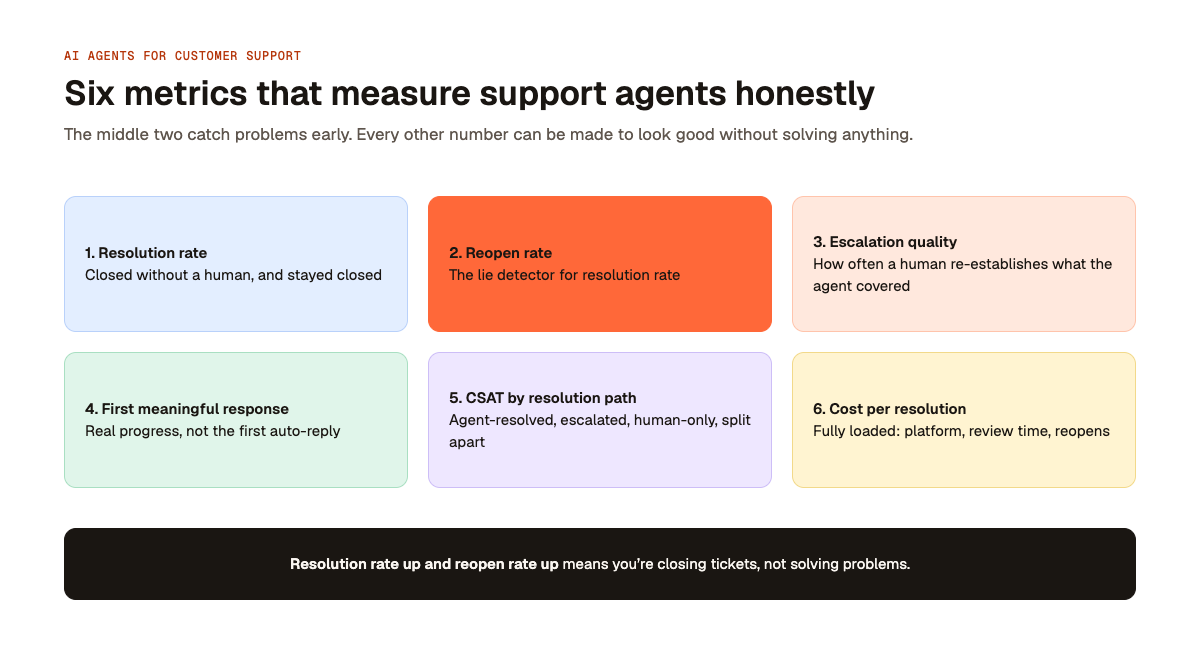
Also worth tracking: containment by ticket type rather than in aggregate, and knowledge gaps surfaced per week, which is a leading indicator of future quality.
Where Libra fits
A support agent that can only see the help centre is a chatbot with better phrasing. The value comes from the same company context the rest of the business uses, which is the argument for a context layer rather than a standalone support bot — the answers your customers need are frequently in engineering docs and resolved tickets, not in published articles.
Libra WorkBase runs Agents and Workflows over a shared Knowledge Base, with Integrations into support and billing systems, permission inheritance from source systems, and Business Intelligence for the measurement above. It deploys to cloud, VPC or self-hosted and is sold by team.
See the Customer Support use case for an example of how this approach applies.
When comparing platforms, assess each option against your knowledge sources, permission model, escalation workflow, deployment requirements and measurement needs.
Frequently Asked Questions
A chatbot matches questions to content. An agent reads account state, reasons about what happened, and can take action. The practical test: can it do something, or only say something?
They change the mix. Volume-driven tier-one work compresses; complex, relationship and escalation work doesn't. The teams that do best plan for redeployment rather than reduction, and explicitly manage the fact that the remaining queue is uniformly harder.
Internal triage and draft-for-agent produce value quickly because neither needs customer-facing autonomy. Autonomous resolution takes longer, and the time goes into permissions, escalation design and evaluation — not into the model.
Design for it: confidence thresholds, scoped permissions, approval on anything irreversible, and an audit trail that lets you find every affected conversation quickly. A system with no plan for being wrong will be wrong expensively.
Only if your support knowledge genuinely lives apart from the rest of the company. For most teams it doesn't, which argues for shared context over a point solution.
Yes. Separate from any disclosure requirement, deception that's discovered costs more trust than automation that's disclosed.
Treat customer content as data, never instruction; scope write permissions tightly; require approval for anything irreversible; and monitor for anomalous tool-call patterns. Narrow permissions limit the damage a successful injection can do.
Reopen rate. Every other number can be made to look good without solving anything.