AI Assistants: What They Are, How They Work & Use Cases
What is an AI assistant? Learn how modern AI assistants work, how they differ from chatbots and AI agents, and what business tasks they can automate.
4 min readby Prithvi

What is an AI assistant?
An AI assistant is software that uses artificial intelligence to help a person complete tasks, find information, make decisions, or interact with business systems.
Early assistants were primarily conversational.
You asked a question.
They gave you an answer.
Modern AI assistants can do much more.
They can:
- Search company information
- Summarize documents
- Draft emails
- Analyze data
- Create reports
- Retrieve customer information
- Update business systems
- Trigger workflows
- Coordinate tasks
- Recommend actions
The key distinction is that an AI assistant doesn't have to be limited to generating text.
It can become an interface between a person and the systems they use to get work done.
AI assistant vs chatbot
A chatbot primarily handles conversation.
An AI assistant can support a broader task.
For example:
Chatbot: "What's our refund policy?"
AI assistant: "This customer purchased the product 18 days ago. They're eligible under the 30-day policy. I've prepared the refund and added the relevant note to the CRM. Would you like me to submit it?"
The difference is not simply better language generation.
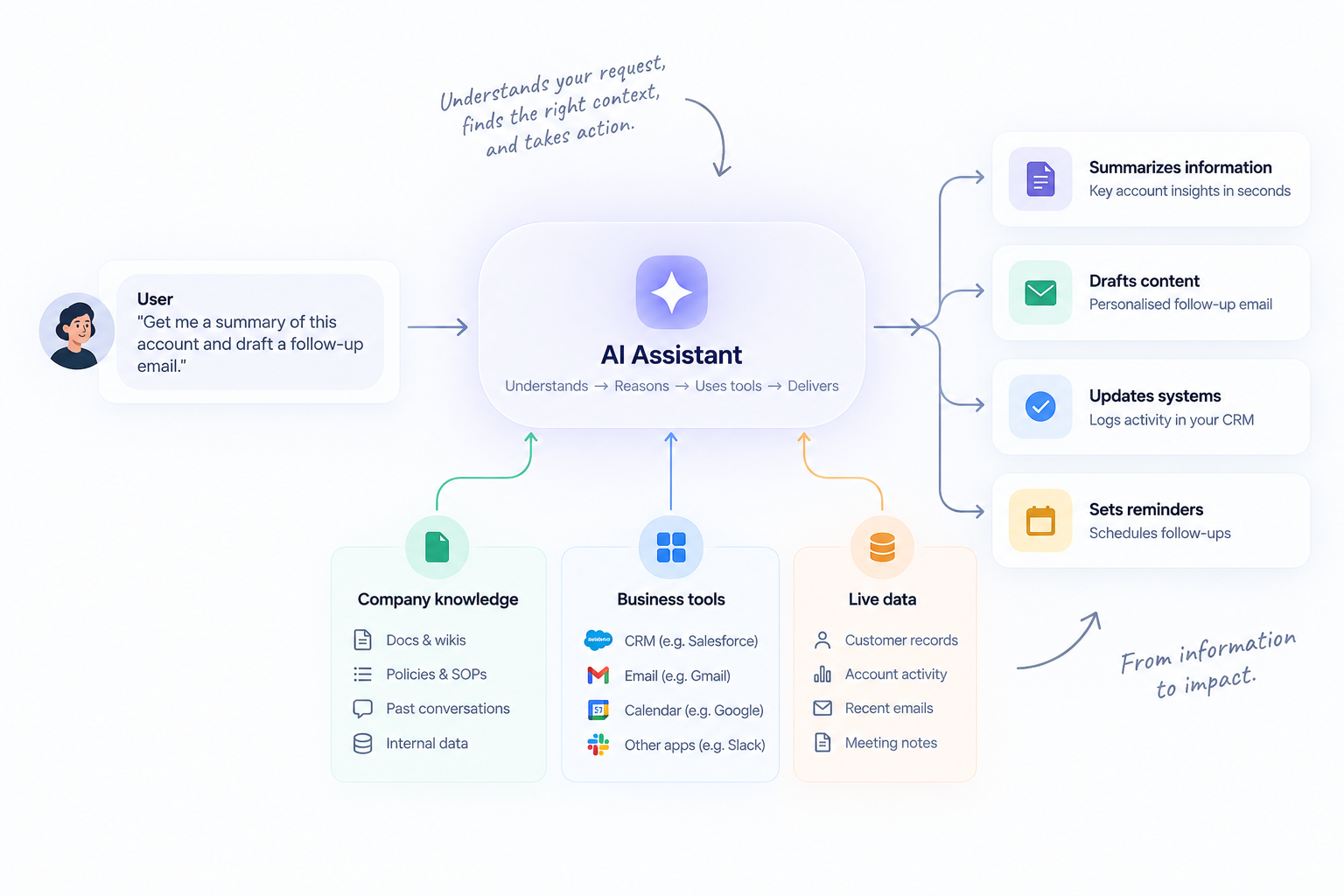
It's context + tools + action.
How do AI assistants work?
A modern AI assistant typically combines several capabilities.
Natural language understanding
The user can communicate naturally instead of learning a specific interface or command structure.
Context
The assistant needs information about the task.
This could come from:
- The current conversation
- Company documents
- Customer records
- Databases
- Previous interactions
- Business applications
Reasoning
The system determines what information matters and what should happen next.
Tools
The assistant can connect to systems that allow it to perform work.
Guardrails
Permissions and policies determine what the assistant can and cannot do.
Together, these capabilities transform an assistant from a conversational interface into a work interface.
What can an AI assistant do for a business?
The answer depends on the systems it can access.
Sales
An assistant can:
- Research accounts
- Summarize calls
- Draft follow-ups
- Update CRM records
- Identify opportunities
- Prepare account briefs
Customer support
It can:
- Retrieve customer information
- Search documentation
- Classify requests
- Draft responses
- Recommend resolutions
- Escalate complex cases
Finance
It can:
- Analyze expenses
- Review invoices
- Identify anomalies
- Prepare reports
- Retrieve financial information
- Route approvals
HR
It can:
- Answer employee questions
- Retrieve policy information
- Support onboarding
- Prepare documentation
- Route requests
Operations
It can:
- Monitor workflows
- Generate reports
- Coordinate tasks
- Identify exceptions
- Update operational systems
AI assistant vs AI agent
This distinction matters.
An AI assistant generally works with a person.
An AI agent can work on behalf of a person or team.
For example:
Assistant: "Find all overdue invoices and summarize them."
Agent: “Every morning, identify overdue invoices, check their payment status, contact the relevant account owners, update the finance system, and escalate invoices that meet our risk threshold."
The assistant helps you perform the task.
The agent can potentially perform the workflow.
In practice, the boundary isn't always binary. Many modern products combine assistant and agent capabilities.
When should you use an AI assistant?
AI assistants work particularly well when people:
- Need information from multiple systems.
- Perform repetitive research.
- Write or summarize frequently.
- Need help navigating complex processes.
- Spend time gathering context before making decisions.
- Want natural-language access to business data.
They are especially useful as a first step toward broader AI automation.
The problem with standalone AI assistants
A standalone assistant can become another tab employees have to manage.
That's why integrations matter.
If an assistant can answer: "What happened with this account?"
but cannot access the CRM, support system, sales call history, or relevant documents, its usefulness is limited.
The real value appears when the assistant can work across the systems where the work actually happens.
The AI assistant stack
A useful business AI assistant can be thought of as five layers:
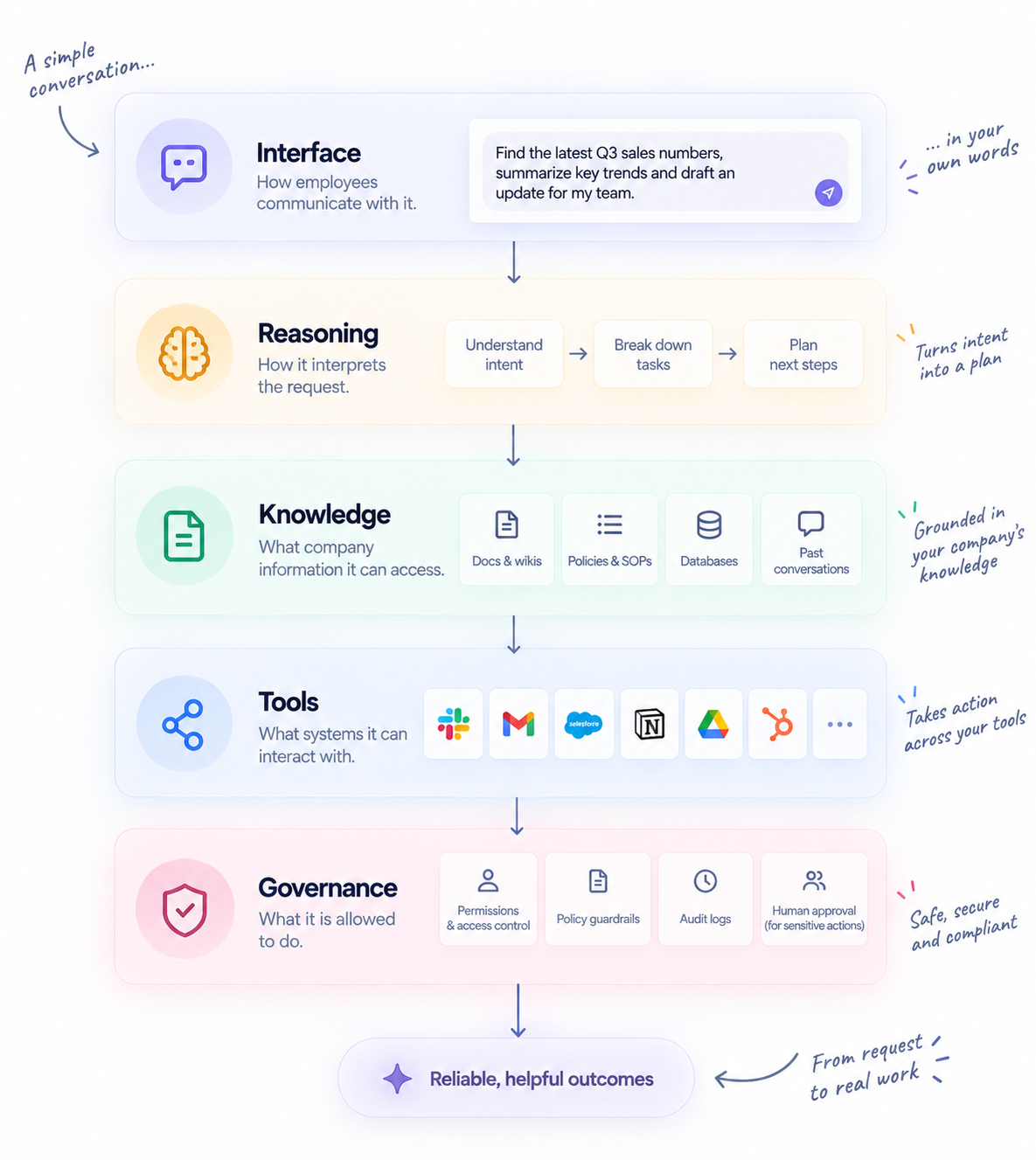
The last three are particularly important for enterprise deployment.
An intelligent assistant without access to the right context cannot do much.
An assistant with unlimited access and no controls is a risk.
The goal is useful autonomy within defined boundaries.
How to introduce AI assistants into an organization
Don't start by giving employees a generic chatbot.
Start with a workflow.
For example: "Sales reps spend 30 minutes preparing for every enterprise account meeting."
Then build an assistant that:
- Finds the account.
- Retrieves CRM information.
- Reviews previous conversations.
- Finds relevant company information.
- Summarizes open opportunities.
- Identifies risks.
- Produces a meeting brief.
Now the value is measurable.
You can compare:
Before: 30 minutes per meeting.
After: 5 minutes of review.
That's a much stronger AI implementation than simply launching another chatbot.
The next generation of AI assistants
The best AI assistants will increasingly blur the line between "assistant" and "agent."
They will start with: "What do you want to know?"
and move toward: "What do you want to accomplish?"
That difference is significant.
Information retrieval helps people think.
Action-oriented AI helps people work.
And when those systems can safely operate across the tools a company already uses, AI becomes less like another application and more like an operational layer across the business.
Build AI that actually works across your business
[See how Libra connects AI to the systems and workflows your teams already use →]